Warcraft III resources & community, 2003–2006 · archived

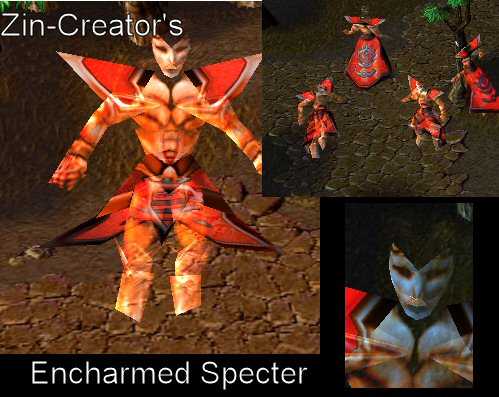
EncharmedSpecter.mdx

3 / 5 (5)
Submitted by Zin-CreatorUnits - Undeads227 downloads135 KB
I used Oinkerwinkle's way of adding transparency, it worked out good. The model has no head crown, no ears, and alot of tiny changes around the model.
Model
EncharmedSpecter
Polycount
449
Textures
2
  • Skin 1 Textures\EncharmedSpecter.blp
  • Skin 2 Textures\gutz.blp
Animations
10
  • Anim 1 Stand 1
  • Anim 2 Spell Attack
  • Anim 3 Walk
  • Anim 4 Stand 2
  • Anim 5 Stand 3
  • Anim 6 Death
  • Anim 7 Decay Flesh
  • Anim 8 Decay Bone
  • Anim 9 Stand Victory
  • Anim 10 Stand Channel
Download

Comments

5
Glad I could help. :D
cool. you even give us the code so we can try it out self, you dont se many model makers do that. 5/5
Here is the opacity code.
Materials 3 {
	Material {
		Layer {
			FilterMode Additive,
			TwoSided,
			static TextureID 0,
		}
	}
	Material {
		Layer {
			FilterMode Additive,
			Unshaded,
			static TextureID 1,
		}
		Layer {
			FilterMode Blend,
			static TextureID 0,
		}
	}
	Material {
		Layer {
			FilterMode Modulate,
			Unshaded,
			TwoSided,
			static TextureID 2,
		}
	}
}
It's opacity, and all has it, maybe ur looking at it wrong. >.>
Why's everything crystalized except for her face and breasts?