Warcraft III resources & community, 2003–2006 · archived

jetpack.mdx

4.4 / 5 (5)
Submitted by theJ89Attachments637 downloads21 KB
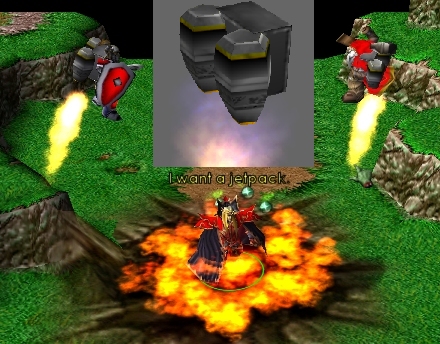
Sixth Model... I spent a while on this. It has a stand and death animation, and has a medium amount of polys. There are a total of three particle effects - the flame jets, and the explosion effect. All you need to do is attach it to the chest of a model. For an added effect, try removing the jetpack when the unit dies. This should make it's death animation activate. I've set up an explosion but it may or not be visible.
Model
jetpack
Polycount
132
Textures
3
  • Skin 1 jetpak.blp
  • Skin 2 jetcyl.blp
  • Skin 3 Flame4.blp
Animations
2
  • Anim 1 Stand
  • Anim 2 Death
Particles
3
  • Particle 1 Right Jet
  • Particle 2 Left Jet
  • Particle 3 Explosion
Download

Comments

19
WOw i was looking for a jetpack and i found it burried here. Pretty nice, but if they had wings would be perfect. 4.6/5 for not having wings.

LOL just use sphere remove all sphere effects, use 1 atatchment, target - 'chest' and it works. however i wanna use it for a model based on villager. And for war3 units at least those i tested it works but for my custom model based on villager - not - not, the jetpack is at his right hand lol...

now.. i have all of it imported etc etc.. my question is this: how the hell do i get it to appear on the back of the unit? i cant find anyway to do it.. please help!!
I’ve tried this a numerous amount of times and have tried all sorts of things when trying to get this model to work. I was able to do the jet pack off model, and I have been fiddling with this model for a while now in the editor, but I can’t get anything to work. I have tried importing/not importing/ and the renaming of the flame4 skin, but I still didn’t find a way to make it work. I’d appreciate it if someone could find out what the hell I am doing wrong. Also if nobody knows, could someone that got it to work send me the map so I can try to figure out what I am doing wrong.
I CANT GET IT TO WORK!!!!!!!! :evil: :evil: :x
Man i used it on a marine and it was kick ass!
:shock: HOLY SHNIKEZE! thats so useful :twisted:

lol very nice :p
Gahahahahahaha thats pretty nice.
hey! i spent a long time designing that skin!

warcraft 3 already has alot of good skins, you can use the siege engine skin to create a dwarfen style jetpack or use the minecart skin to create a metal jetpack.
allthough a bit over-the-top for a warcraft thing,(allthough i did find this wich is a offical warcraft illustration probubly for the role playing game, it shows a gnome with 'jatpack boots') its a nice idea and good mode, especially if you dant have to import much skins for it. eccellent for b.net maps.
hey! i spent a long time designing that skin!
great model wiht low polys.
4/5
...
i did it, it works perfectly.
i also used the minecart texture to save the space the other two skins take.
get optimized jetpack here.

Some tips for effective use of this model:
1. Use the storm crew form ability for landing and take off.
2. Use an aura instead of attaching with triggers, simply remove all effects and change the target model to the jetpack model.
3. set Art - Animation - Unit walk speed and run speed to 10000
this will not effect actual moving speed just the animation
4. set Art - Death time to 0.10, this will still cause some units to release blood though.
thanks everyone ^^ - shadow, I attempted several times to redirect the texture to the MPQ, but every time it failed.
this is your first model thats acctualy useful 5/5.

EDIT: you dont need to upload the flame4.blp skin, its already included in the mpq, the maker of this model should edit the path to "textures\flame4.blp"
LOL! This is great, very cool 5/5
Up, up, and AWAYYYY....!! :o
hehe... good, i think i would be quite usefful :D
its a cool modle it would be fun on goblins and could well use darky's jet pack spell.

heh heh i got the first down load. :)