Warcraft III resources & community, 2003–2006 · archived
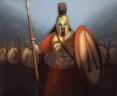
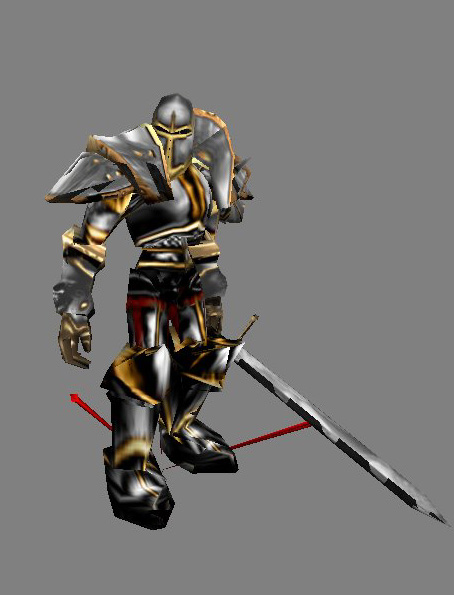
SilverKnight(Sword).mdx
★ 4.73 / 5 (11)
Submitted by MiseracordUnits - Humans5,525 downloads421 KB
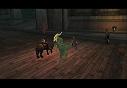
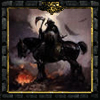
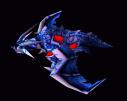
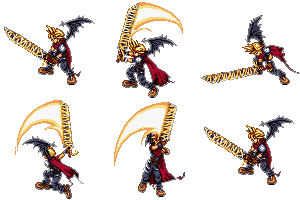
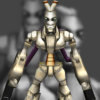
This is the first model back after a while. As usual, this is a Beta, and there ARE small glitches with the model. I'm telling you this now, rather than hearing it a million times. None of them are actually visible during game play. The anims come from the one-headed ogre, and a critical strike/spell slam anim is included from it. To give credit where it is due, the sword is once again, the Aragornsword by Sansui. The body's skin was taken and modified from WhiteHorn's Arch-something or other skin (thanks for the rest of the model :P). The rest is all me....and Blizzard. A portrait is included, and i apologize for the crappyness of it, but most of you said you'd rather have a shitty one than none at all. Give credit where it is due, and enjoy :)
doesn't work... even with the sword texture (yes I asigned the correct paths)... Even more odd is that the portrait does work... but the model (bit more important to me) doesn't... And I can't just let a chest with a head on float arround in my map... I NEED this
Ok, I figured out how it works. Here is a step by step to tell you how to properly bring him into the game.
1. Download this model and extract it (Duh! ) 2) Go to "Textures" and delete file "BloodElf-SpellThief.blp". (It is totally useless) 3) Go to http://www.wc3sear.ch/index.php?p=Models&ID=683&sid= 4) Download and extract "Aragon’s Sword" from this website. 5) In "Aragon Sword" go to "Textures" and copy file called "Aragon’s Sword.blp" 6) Paste this file into your Silver Knight "Textures" folder. 7) Now in game you insert your "Aragon’s Sword.blp" a path name "Textures\SKblade.blp" (Without quotes)
I hope that this resolved your problem with the model Myself I think this model is amazing but 1,11MB isn't that a bit too much?
I can get the model to work, except that there are large open spaces in the armor. Are these where the gutz skin is supposed to be? I read your post that the gutz script is in the game, maybe it is in yours but mine doesn't have it. Other then that it is a great model 4/5
so is that the problem i'm having? when i put the model (mdx) on the peasont- the actual model doesn't load. However, the portrait model does load... so i could have a peasent that is a floating head. get it?
Yeah I saw it as well. This guy gave you wrong skin: Textures\BloodElf-SpellThief.blp
It is TOTALLY for another guy . You need to make sword yourselfs or w8 for about 5 years untill Miseracord sends it here. JUst make a new sword and use a path: Textures\SKblade.blp
i found that this guy doesnt work ingame... cause u did not submitted the skin for the sword(well i found it out in wc3 viewer, so i may be wrong) but, as u said, he uses the aragorn sword, so the skin is the same... with other path: Textures\SKblade.blp
i believe u wont be mad at me for letting other pple use your model
now that i see better.... the aragorn sword skin wont fits right.. anyway, it should work
i must b the dumbest person on the face of the earth... i cannot for the life of me get this to work, this is exactly what i do: 1) extract it to my warcraft III folder 2) go into the editor and import all files from that folder (total 6 files imported) 3) edit the paths exactly how the site says to edit them 4) save and exit the editor 5) go into and change the model for a peasant (juss cuz im trying to get it to work) to the main mdx file 6) put a peasant onto the map and it says unable to load the model...
Please Help! i am also having the same problem with other models as well, som i can get to work, like the mage and warlock models but most will not work! thx
I figured that, but i can't find out how to fix it. I had the same problem with the chaos spider, village warrior, and several others,or else maby its because i have the origional warcraft3 disk, but that shouldnt matter ecause i can play the expantion off of it. Anybody wanna tell me how to fix it
Yea great model, but I agree with the other people in that the animation shouldn't be an ogre animation. They tend to "hop" around other than walk around. This makes the model look humorous, but paladin or blademaster (even a footman) animation will look much better. Good job by the way
you shouldnt use ogre anims for a knight.. ogres walk around 'jolly and chubby'. I think blademaster anims would look a lot better on such units as these knights of yours.. or arthas/paladin anims at least.


 (4/5)
(4/5)
 )
)