Warcraft III resources & community, 2003–2006 · archived

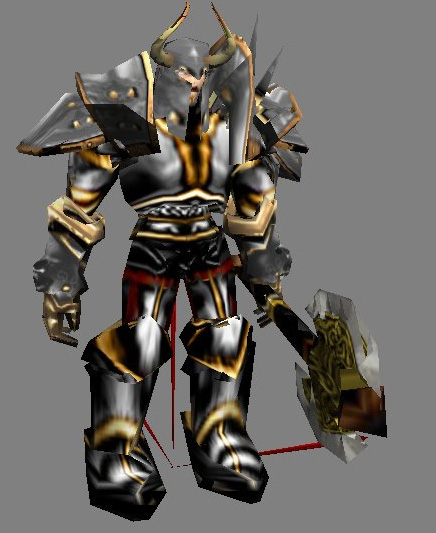
SilverKnight(Axe).mdx

4.2 / 5 (10)
Submitted by MiseracordUnits - Humans3,286 downloads415 KB
As usual, this is a Beta, and there ARE small glitches with the model. I'm telling you this now, rather than hearing it a million times. None of them are actually visible during game play. Once again, the anims come from the one-headed ogre, and a critical strike/spell slam anim is included from it. To give credit where it is due, The skin from the Axe (just the LordGarithos Axe) comes from Urkdrengi's Dwarf Warrior model. The body's skin was taken and modified from WhiteHorn's Arch-something or other skin (thanks for the rest of the model :P). The helmet was taken and reshaped from Max666's Orc Warlord model. The rest is all me....and Blizzard. A portrait is included, and i apologize for the crappyness of it, but most of you said you'd rather have a shitty one than none at all. Give credit where it is due, and enjoy :)
Model
SilverKnightAxe-Miseracord
Polycount
1622
Textures
5
  • Skin 1 Textures\BloodElf-SpellThief.blp
  • Skin 2 Textures\Shoulder1.blp
  • Skin 3 Textures\SKmain.blp
  • Skin 4 Textures\star4.blp
  • Skin 5 Textures\gutz.blp
Animations
12
  • Anim 1 Stand
  • Anim 2 Stand 2
  • Anim 3 Stand 3
  • Anim 4 Spell
  • Anim 5 Stand Ready
  • Anim 6 Attack
  • Anim 7 Attack 2
  • Anim 8 Attack Slam
  • Anim 9 Death
  • Anim 10 Decay Flesh
  • Anim 11 Decay Bone
  • Anim 12 Walk
Particles
2
  • Particle 1 BlizParticle For Ogre Magi
  • Particle 2 BlizParticle For OgreLord
Download

Comments

18
Here is how i got this model to work like it should:

1. Open up war3x.mpq with any MPQ viewer and extract Units\Creeps\LordGarithos\LordGarithos.blp.
2. Import it into your map using the path Textures/Axer.blp.
3. Import the other files that you downloaded from this page but ignore Textures\BloodElf-SpellThief.blp , its useless for this model.

This worked for me, i hope it does for you too.
i cant see him :evil: :evil:
The file is confusing, it has 2 models and 3 textures wtf is up with dat?!, also it did not work for me. Make the file simpler, just 1 model i it that works without a texture!
I downloaded it for the 1031st time. and it is pretty good but the face is ugly lol, 4/5 :D :D :D :D :D :D :D :D :D :D :D :D :D :D :D :D
i have the same portrait problem. Its like a floating head.
I cant import it to my map
I dont see him
I see only PORTRAIT
I like the model very much! if my map size wasnt so big I would use it :shock: 5/5

to zulzin: it doesnt matter where u put the file... just open your map, import this model and delete 'war3imported' at the path of the model.
Goodlooking, but that face is ugly. But...3/5 this time.
cool i like the axe its pretty cool but im givin it a 4/5 cuz the armor looks like it was put together from other pieces of armor....so 4 sum reason it looks like its gonna fall apart
Since iam new what file do I extract it to so i can use this in my game or map
the whole thing is great even thoguh the skin is ugly.
i knew right away were the boots were from.whitehorns archbody.ive seen all the skins in the gallery...
3.5/5 allot token form others...
the skin, looks so confusing....

like u have put the pieces of his armor aleatory, it doesnt fit well though, the wrap is crappy too

if u put more effort on it im sure it can be even better than the Deimos' u submited here(deimos rlz)

3/5 it could be better dude
would be excellent with some more work 3/5
5/5 for his purpose anything else like a demon>2/5< a king>4/5< or a peasent>0/5< would have been bad put for his purpose of creation 5/5 :twisted:
All is far from perfect, except me! :twisted: LoL

4/5

his awesome but the skin... its far from perfect 4/5
I love you
Good model ! Just what I need

4 of 5 is my mark to this work