Warcraft III resources & community, 2003–2006 · archived

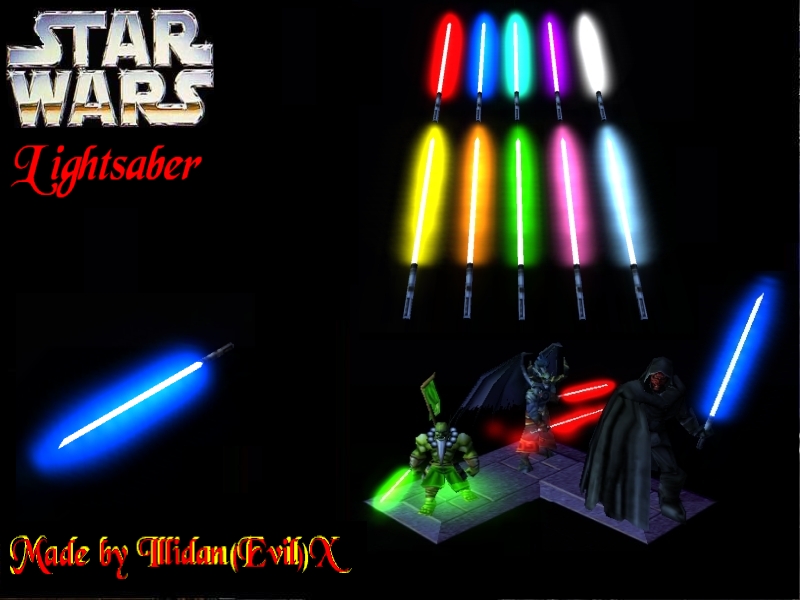
Lightsaber3D.mdx

not rated
Submitted by Illidan(Evil)XAttachments2,419 downloads28 KB
Model made by Illidan(Evil)X. skin by Olofmoleman. The TeamGlow15.blp skin is not needed for this model. Give credits if you use this model in your map. This model was made for Star Wars: The Journey - http://swtj.funpic.org
Model
LightSaber3D
Polycount
100
Textures
2
  • Skin 1 Lightsaber.blp
  • Skin 2 ReplaceableTextures\TeamGlow\TeamGlow15.blp
Download

Comments

46
The lightsaber (and any team-glowing attachment I use btw) is always red no matter what -_-; Any ideas about what might be the cause?
i need help making it show up on my map PLEASE HELP
False Allarm ,i fixed that NOw i need to know how to remove the weapons of some heroes like demon hunter paladin etc. and to place others? :?:
Ok ,guys but i didn't understood HOW TO HELL DO I CHANGE THE DAMN LIGHTSABER COLOUR??? :evil: It's always red!No mather what!
on my models the lightsabers are always red.. any idea how to fix that..?
it says i need ReplaceableTextures\TeamGlow\TeamGlow00.blp
but i cannot get hold of this file :S
I made a few Jedi and Sith, but most have allready lightsabers.
The ones with lightsabers
female Jedi
Mace Windu
Darth Vader
General Grievous

The ones without a lightsaber
Darth Maul
Darth Nihilus (made by my Brother and me)
Yoda


tthe ones WITH "lightsabers" only have a sword with a colored blade, the ones without lightsabers, I DUNNO!! o yeah and heres an idea how 2 give jedi a lightsaber

EVENT: Unit is trained

Condition: Trained unit Equal to Jedi

Action: Special Effect: Attach Effect: Lightsaber to trained units right hand (or weapon).

Shold work, now how 2 change colors? OMFG I HAV NO IDEA!!!
Ok, I figured out how to attack it perfectly.
1. Make an item out of the Night Elf Flag or whatever flag.
2. Then go find the abaility linked to it its caled like Item Night Elf Flag or something.
3. Change the model file of from the night elf flag to the lightsaber.

Now you have an item that when picked up looks like a guy holding a lightsaber and when he drops it it dissapears.

The thing is I do not know how to change the color of the blade when I do this from white... Any ideas?
How do i change the colour (not to the unit colour but to a specific colour)
:evil:
HELP ME OUT PEOPLE!!! I DID EVREYTHING...EVEN THE STRING!! BUT THE THIN WONT D*M WELL WORK HELP ME OUT!!PLZ PLZ PLZ PLZ PLZ PLZ PLZ PLZ :cry: :cry:
:oops:
Now i now how to give units the wapons......
its so easy but.....
Now i can give my units new weapons.
Thats greate :D
ok i did the string for the right hand but the sabre is
just under him plz help. what ablity can i use so he
can put the sabre away cuz the sabre gonna be an
item like a weapon and i need him to be able to put it away. :?:

ps look at nex power speed his explanation mark is upside
down those crazy spanish peps (no insult meant)

p.s.s also onikwinkle vertex tool is very complicated
(i cant even get a modle to come up let alone revove the weapon
because i need to remove many wc3 unit weapons so i can use those units
as jedi or sith with thier light sabres and to make kriea. is there an easier
way to learn to use it?
good and evil by removing the dark ranger's arrow hilt and her bow for evil kriea
same with salvanas for good kriea so plz help illidan or anyone who can help.
illidan, i think u should use mine the next time ur tryng to describe how....
1. Go to Unit editor (the Mask)
2. Click on the Abilities Tab
3. Go to neutral Hostilead look for life regeneration aura (nuetral)
4. Copy then Paste that any where
5. If you already imported the file, go to art target- *blank* double click, add model and choose the lightsaber model
6. to choose which hand it goes in, go to attachment point 1 right below it, and click add string and type either right hand, or left hand
7. Choose a name for your ability (ex. Lightsaber right hand)
8. Go back to your unit section, and click the unit you want to have the lightsaber.
9. if it's a hero, add it to the line that inventory (hero) is in, if it's a normal unit, add that ability under abilities.
10. save your map so u don't have to do it again :)
How I can attach the lightsaber¡

My English isn´t very good, and I don´t understand very well the instructions
do any of those things work on macs????
To remove the weapon you can use oinkerwinkles 's Vertex Modifiy tool (http://www.oinkerwinkle.com/tools/download.html) or some other modeling tools.
deathmu are doing it wrong, it is supposed to look like this

Lightsaber.blp
ReplaceableTextures\TeamGlow\TeamGlow15.blp

now i get everything to work, except when i tried a different model to take the place of the blade masters weapon, for attachment point, i put in weapon just like you said, but it put it on the tip of the weapon, i tried with the lightsaber as well jst to make sure i was doing it right. How do we mke it replace the weapon???
I can't seem to get the model it self to show up. In the import manager i have the path like this:
Lightsaber3D\Lightsaber.blp
war3mapImported\Lightsaber3D.mdx
Lightsaber3D\ReplaceableTextures\TeamGlow\TeamGlow15.blp

Is this correct or am i missing something...? i'm new to importing so i don't really know what i am doing :? .
thx, that really really really helped :D
a
Edit- but, now it doesn't work period. For attachment were the value starts at zero, do i change to one???
i don't know how to attach it to the hands, because all the attahing points are strings.... and this doesn't help, with like blademaster as stuff....

P.S. - i got the ability to work, but it always attaches to it's right foot... that's y i need to know


For the atachement strings, you need to use "left hand" or "right hand", and for a blademaster you should use "weapon"
1 - Open up object editor, go to Abilities.
2 - Click Ctrl-F and a window will pop up, type in life regeneration aura and copy and paste the spell.
3 - Set Amount of hit points regenerated to 0.
4 - Set target art to the Lightsaber3D.mdx, and attachment point to left or right hand.
5 - Set targets to only self
6 - Add the modified life regeneration aura spell to your units and they will have a lightsaber which changes to their player colour.


i don't know how to attach it to the hands, because all the attahing points are strings.... and this doesn't help, with like blademaster as stuff....

P.S. - i got the ability to work, but it always attaches to it's right foot... that's y i need to know
i'm very new at this, so how do you integrate this file into like a yoda/darth maul/blademaster/arthas/and everyone with swords ....... model???

because that would b really helpful on my star wars foooties game... :shock:

looks good, if i knew how to use it
This thing is the 1st thing on this web
that I dled, it is truly fantastic and I
think you should make some starwars spaceships
and also csn u make a mini lightsaber 4 yoda plz
:twisted:
what we need is a luke skywalker
uhh ya, i don't know why but i did exactly what you said to do but i still can't get it to work. I see the lightsaber in the editor but it never appears in the game.
I used the modified life regeneration, but when I revive my heroes at an altar, the lightsabers are always back to the original red, instead of the team color
Any help?
How to use:

1 - Open up object editor, go to Abilities.
2 - Click Ctrl-F and a window will pop up, type in life regeneration aura and copy and paste the spell.
3 - Set Amount of hit points regenerated to 0.
4 - Set target art to the Lightsaber3D.mdx, and attachment point to left or right hand.
5 - Set targets to only self
6 - Add the modified life regeneration aura spell to your units and they will have a lightsaber which changes to their player colour.


This will serve in a Spanish Editor? And, I don´t understand the points 4 and 5
I made a few Jedi and Sith, but most have allready lightsabers.
The ones with lightsabers
female Jedi
Mace Windu
Darth Vader
General Grievous

The ones without a lightsaber
Darth Maul
Darth Nihilus (made by my Brother and me)
Yoda
we need some jedis in here. theres like 10000 models and only like 1 useful jedi
WHAT I NEED TO DO TO LEFT THE ORIGINAL WEAPON AND USE LIGHT SABER? plz i need know it =P
I told you to make the double ended lightsaber b4 it was posted..Great job.The starwars models are turely fantastic!
Use the Lightsaber, I will.
This is...is...is....

I dont know a word to describe how beatiful and amazing this is...

I havent been as happy as this since forecer!

99999999999999999999999999999999999999999999999999999999999999999999999999999999999999999999999999999999999999999999999999999999999999999999999999999999999999999999999999999/5
VERY GOOD NICE WORK!

WHAT I NEED TO DO TO LEFT THE ORIGINAL WEAPON AND USE LIGHT SABER? :D
Demonic Power

Anyway you should make a double ended one for the darthmaul model


It is done
thanks a lot, you're the best
How to use:

1 - Open up object editor, go to Abilities.
2 - Click Ctrl-F and a window will pop up, type in life regeneration aura and copy and paste the spell.
3 - Set Amount of hit points regenerated to 0.
4 - Set target art to the Lightsaber3D.mdx, and attachment point to left or right hand.
5 - Set targets to only self
6 - Add the modified life regeneration aura spell to your units and they will have a lightsaber which changes to their player colour.
This might sound stupid, but how do you change the lightsaber color?

p.s. this is the best lightsaber model i've ever seen
thx olof
It looks really, really, really, really, really, really, coool!
Wierd idea james...Anyway you should make a double ended one for the darthmaul model
MUCH BETTER THEN YOUR LAST!IT ROCKS! :shock: :D
yes! this is perfect for what i need. I dont really need a light sabre but i could do with this to use it as a projectile for spaceships in my map. :D perfect!