Warcraft III resources & community, 2003–2006 · archived

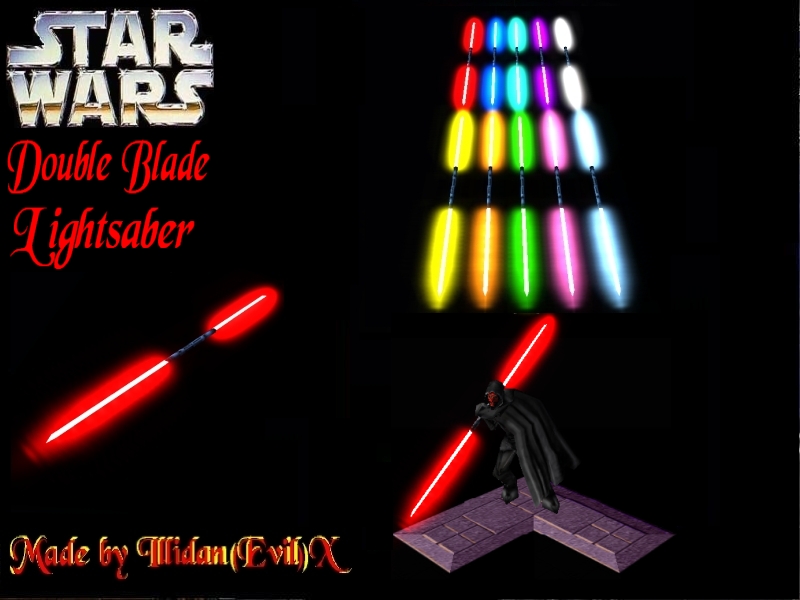
DBLightsaber3D.mdx

not rated
Submitted by Illidan(Evil)XAttachments1,878 downloads29 KB
Model made by Illidan(Evil)X. skin by olofmoleman. the TeamGlow15.blp skin is not needed for this model. Give credits if you use this model in your map. This model was made for Star Wars: The Journey - http://swtj.funpic.org
Model
DBLightsaber3D
Polycount
188
Textures
2
  • Skin 1 Lightsaber.blp
  • Skin 2 ReplaceableTextures\TeamGlow\TeamGlow15.blp
Download

Comments

21
Couldnt you use the editor to change the colour of it?
dude illida(evil)x i have a registered user at the site buuuuut no1s been on since like, september 11 man thats just not right, im kinda confused about that :?
The Colour on the lightsaber does not change to the team colour its always red
does anybody read the reviews before downloading, you can learn alot from the very bottom as a matter of fact :!: :?: :!: hope i helped :D
on my models the lightsabers are always Red , any idea how to fix that? :?
Hey Illidan, when i thank you for models, can i thank you in loading screen?
Thank you
I tried using it in my game, a star wars AOS type game, but when I attached the lightsaber via ability, it would not use the team colors, so in the end, I have a bunch of Jedi wielding red lightsabers and a bunch of sith wielding red lightsabers... anyone have any idea how to allow the team colors when its attached to the characters? Better yet aloow me to choose whatever color I want for it.
WOW WOW WOW 5/5 :shock: :D
:twisted: :twisted: :twisted: I AM SO :D 5/5
:? it seems i cant get the blasted thing to work...OMFG
thx i had it on right hand and it only worked on blood mage but now it works thx man
How do we set attachment point left hand or right hand?

When you select the ability in the abilities editor, there should be a line that reads "Art - Target Attachment Point 1".
Just create two entries here, for example:
hand
right
if you close the window now, the line should read:"Art - Target Attachment Point 1 hand,right".
Now the attachment model should be attached to the right hand of the unit.
You are so smart. I've always wanted something like this and now i have it. Thankyou it is really A+++++++ :lol: :o :( :) :D :shock: :? 8) :P :evil: :twisted: :roll: :wink: :!: :!: :!:
You should modify all old models holding lightsabers and remove them.These are so cool so we could just attach these!


most of the Jedi and Sith models on the site are made by me, some models I'm absolutely not going to change but, maybe I'll change the female Jedi model. and when I make a male Jedi, it'll be without any lightsabers.
How do we set attachment point left hand or right hand?
can u attach this using the trigger thing...cuz thats what i do
There was already a DS lightsaber made on the site, but this is MUCH better. Nice job.
You should modify all old models holding lightsabers and remove them.These are so cool so we could just attach these!
Illidan(Evil)X - YOU GENIUS!!!! :D
clap clap clap ! :D
How to use:

1 - Open up object editor, go to Abilities.
2 - Click Ctrl-F and a window will pop up, type in life regeneration aura and copy and paste the spell.
3 - Set Amount of hit points regenerated to 0.
4 - Set target art to the DBLightsaber3D.mdx, and attachment point to left or right hand.
5 - Set targets to only self
6 - Add the modified life regeneration aura spell to your units and they will have a double blade lightsaber which changes to their player colour.