Warcraft III resources & community, 2003–2006 · archived

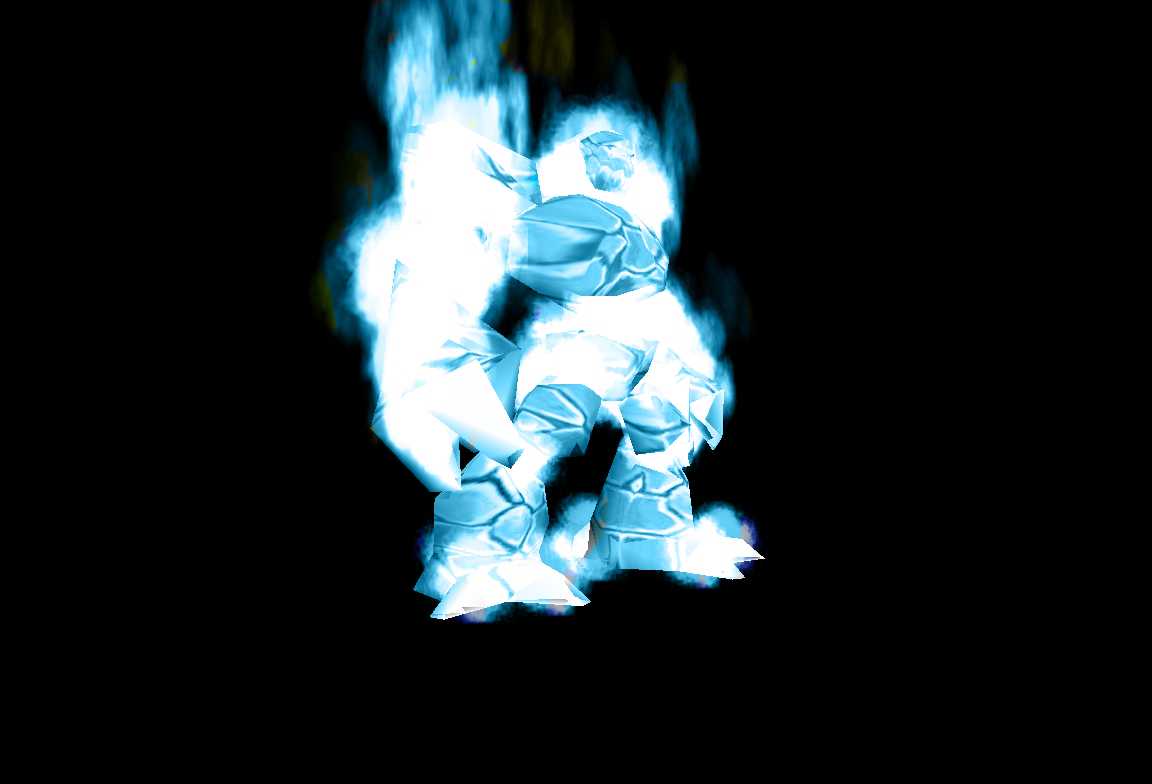
BlueInfernal.mdx

4.83 / 5 (6)
Submitted by evilwart-dragonUnits - Deamons4,451 downloads577 KB
The Blue Inferno, can be a blue flamed Inferno or a Ice Inferno. I will have a red one out soon.
Model
Infernal
Polycount
978
Textures
4
  • Skin 1 BlueInfernal.blp
  • Skin 2 Blueclouds_anim1_bw.blp
  • Skin 3 BlueClouds8x8.blp
  • Skin 4 BlueYellow_Star.blp
Animations
10
  • Anim 1 Stand
  • Anim 2 Stand 2
  • Anim 3 Stand 3
  • Anim 4 Stand Ready
  • Anim 5 Attack
  • Anim 6 Attack 2
  • Anim 7 Walk
  • Anim 8 Birth
  • Anim 9 Death
  • Anim 10 decay
Particles
6
  • Particle 1 BlizParticleShoulderLeft
  • Particle 2 BlizParticleHandRight
  • Particle 3 BlizParticleShoulderRight
  • Particle 4 BlizParticleHandLeft
  • Particle 5 BlizParticleNeck
  • Particle 6 BlizParticle02
Download

Comments

35
I have a better idea.Create a radioactive meteor to use it and in the same time create a radioactive Infernal and the birth of it,so that we can use it.You'll be given a perfect 5/5 if you do it.I want to use it in my map.
Nice Model 4.8/5 but try to make it smaller :roll:
I typed in the path names, but i still cant see it!
this may look like a sick ass model, but it seems no one can get it to work, so unless you can tell us how to make it work, I dont think many people will want it on the site anymore cuz all it would do is take up space
there are no paths, just delete the war3mapimported\ and leave the texture name.
uh........ paths plz?
ok seriously, i've been trying to get this right for ages now, I have 6 things in my import manager, please just tell me what to put in each and everyone (give me file name, type size, and full path)
Doesn't work for me :( I tried deleting the war3imported\, and even making it the original infernal paths, but nothing worked :cry: for some reason none of the ice infernals work :(
BABY_VAMPIRE: I can get the folder, but i cant get the skins... :?
it doesnt work :cry: :cry:
Help me Out model dosen't show up for my all i get is the portrait :evil: :evil: :evil:
yah, cooter. 90% of time to get the path u just remove the "war3.imported/" part of the path it gives u. :roll:

thats what i do, and it has worked on all my models
i would rate this a five if it worked because the portrait looks awesome but model does not show up. why :?:
I'm sorry... but I'm a real noob at this, how do you guys get the paths right all the time? I've been messing with the paths for this (and several other models) for a few hours and I haven't picked up a pattern yet... unless they include a readme telling me what the path is, I'm stuck in a guessing game...can anybody clear this up for me?
Hey I just noticed something... in the MDL file your model is instructed to find a file named "BlueClouds8x8Grey.blp", but the zip file doesn't contain it. Maybe that's why it won't load for most of us. FIX IT and in the meantime, for everyone who's can't get it to work, I suggest extracting "Textures\Clouds8x8Grey.blp" from the war3.mpq with WC3 Viewer and renaming it "BlueClouds8x8Grey.blp" and importing it with no path. All skins for this model are imported with no path.
it works on both ways either
Textures\ BLABALBALBALBLBAQ.blp or blblaabllababl.blp
worked for me either way


model well id give you a....a.....10! but the highest it can go is 5 >.<
whats the path i only see the portrait tell correct path
:( Hey the paths don't work the only thing i see is the portrait but the other blp and mdx don't work why???? write the correct paths!!!!
:x :x :evil: :( GIVE US THE PATHS!!!!
NOW!!!! NOW!!!!!!!![/code]
well I don't think it'd be an Ice Infernal... Inferno... Infernal... Inferno means fire..... Ice can't be fire... can it?
this looks great but so big.... i wonder if you could use the main skin on the normal infernal, it wouldnt look as good, but maybe it'd be smaller
Any help getting the flame to be the correct color would be greatly appreciated. I suspect I'm not the only one with this problem.
the model and skins are totally not workin 4 me, i entered the right paths but they juz never show up in the game :(
Am I the only one not getting this to work?
The Blue Inferno, can be a blue flamed Inferno or a Ice Inferno. I will have a red one out soon. -evilwart-dragon


evilwart-dragon how soon is soon?
Doesn't seem to work.

The model file references some .blp called "BlueClouds8x8Grey.blp" that isn't in your distribution or anywhere in the MPQ (war3.mpq) as far as I've seen. There is a "Clouds8x8Grey.blp," but this doesn't seem to work. I've got the model skinned correctly but with yellow-green fire, currently.
:shock: :shock: :shock: :shock: :shock: :shock:
PATHS -
BlueInfernal.blp
Blueclouds_anim1_bw.blp
BlueClouds8x8.blp
BlueYellow_Star.blp
Thisd be an exelent archon for any starcraft map, the red one could be a dark archon!

GIVE THE PATHS TO US!!! :evil: :!: :!: :!:
cool
I Experienced the same as Halkor!!!

Give us some Paths:!: :!: :!:
I downloaded it, excited to add it as a summonable to my Ice Tiki Mage but I have run into a problem, I have imported all the files and all come through fine but the actual BlueInfernal.mdx won't show up in-game :evil: , and when i do choose it for model it says BlueInfernal.mdl instead of the *.mdx :( . The only model imported was the portrait which I don't know where to put that on the custom infernal I am making :shock: . If anyone can help that would be great!
Nice, but a big file. Nearly 600k when it's zipped..
Pretty nice ! Good job !