Warcraft III resources & community, 2003–2006 · archived

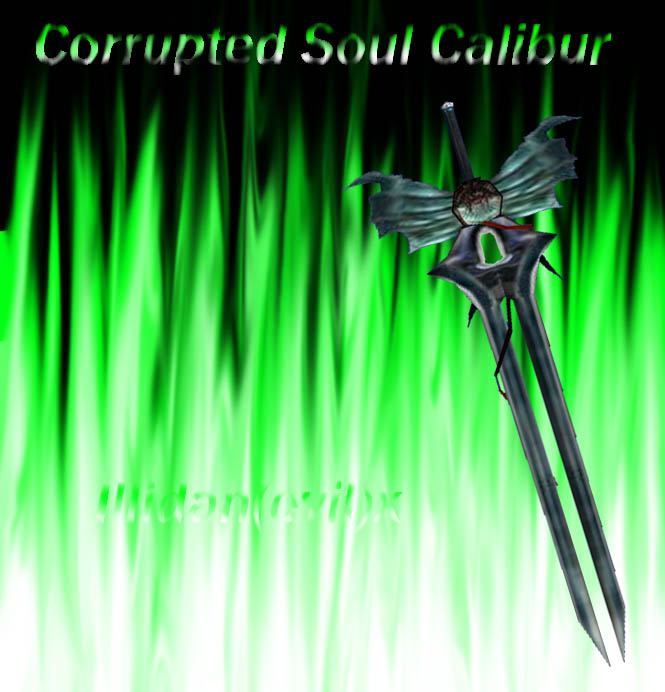
SoulCaliburCorrupted.mdx

not rated
Submitted by Illidan(Evil)XAttachments1,626 downloads51 KB
Corrupted Soul Calibur item and attachment

Soul Calibur, a weapon imbued with divine energy, appears and seems to destroy Soul Edge.
Soul Edge's power is not eliminated, however, and its influence continued to wreak havoc on the world and on Soul Calibur, which became partially corrupted.

GIVE CREDITS IF YOU USE THIS MODEL IN YOUR MAP!
Model
Soul Calibur Corrupted
Polycount
288
Textures
6
  • Skin 1 Textures\CorruptSoulCalibur.blp
  • Skin 2 Textures\GenericGlowX.blp
  • Skin 3 Textures\GenericGlow2b.blp
  • Skin 4 Textures\Star2.blp
  • Skin 5 Textures\Star7b.blp
  • Skin 6 Textures\Sun.blp
Animations
4
  • Anim 1 stand alternate
  • Anim 2 stand
  • Anim 3 death
  • Anim 4 birth
Particles
2
  • Particle 1 Particle_nr_1
  • Particle 2 Particle_nr_2
Cameras
1
  • Camera 1 Camera01
Download

Comments

16
:o :D :o very nice 5/5
8)
Can you tell me how to attach that model, because I am making that map and I got that cool model, but that model has no sword so I want to add one, and I don't know how to... :( :( :(
DONT YOU LISTEN
This model is both a item model and attachment model.
To use the attachment animation (stand alternate), open your object editor and find the unit you want to attach the model to.
Scroll down until you find the "Art - Required Animation Names - Attachments"
Add a string called "alternate" here.
Attach the sword to the unit, and the stand alternate animation is now showing.
BTW I CLICK on the link but it just keeps highlighting the word!?!? :shock: :shock: :roll: lol (just making a sarcastic remark about the link, im not that retarded to think that)
DONT YOU LISTEN
This model is both a item model and attachment model.
To use the attachment animation (stand alternate), open your object editor and find the unit you want to attach the model to.
Scroll down until you find the "Art - Required Animation Names - Attachments"
Add a string called "alternate" here.
Attach the sword to the unit, and the stand alternate animation is now showing.
BTW
I know how to attach BUT this weapon i can not attach because it spins a round everywhere
world-editor-tutorials.thehelper.net/attachments.phtheres the site i learned how.
K i want to use these 3 cool weapons but i need them to attach to the unit when he picks up a sword item, how do i do that?
Wow :!: :!: :!: :!: :!: This is ALMOST the excact model of the Corr. Soul Calibur : :twisted: :twisted: :twisted: :twisted: :twisted: :twisted: :twisted: :twisted: :twisted: :twisted: :evil:
This model is both a item model and attachment model.
To use the attachment animation (stand alternate), open your object editor and find the unit you want to attach the model to.
Scroll down until you find the "Art - Required Animation Names - Attachments"
Add a string called "alternate" here.
Attach the sword to the unit, and the stand alternate animation is now showing.
wtf is this a weapon attachment? if it is y does it spin around of the back of the unit when i try and attach it? If it's not a Weapon attachment then what is it?
Awsome like the other ones 10/5 how long did it take to make them?


hmm..
about 3 hours at the base model + skin, icon, particles, animations and screenshot..
That's about 6 hours each model.

Why do you ask?
make more attachments this is nice
6/5 :twisted:!!!
Awsome like the other ones 10/5 how long did it take to make them?
very nice 5/5