Warcraft III resources & community, 2003–2006 · archived

DarkElfAssissianv2.mdx

not rated
Submitted by WolfmanArcUnits - Bloodelfs1,811 downloads242 KB
Model
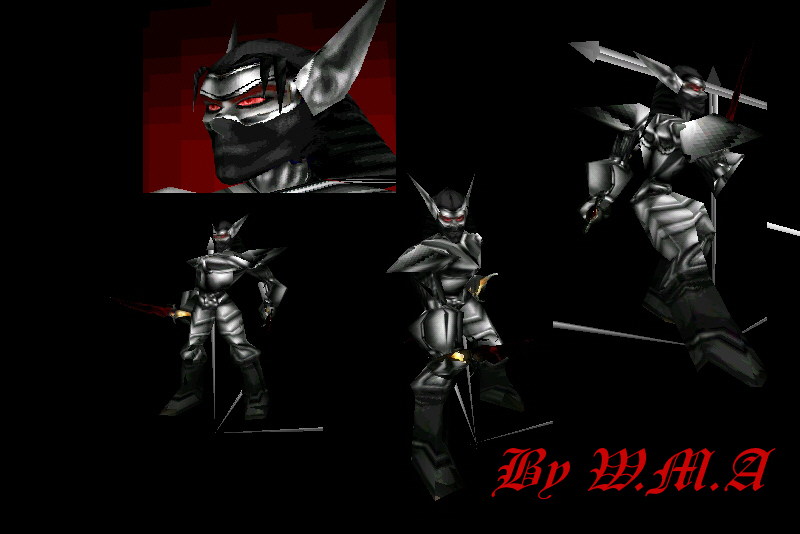
DarkElf Assisian
Polycount
1114
Textures
2
  • Skin 1 Textures\DarkelfAssissian.blp
  • Skin 2 UI\Widgets\EscMenu\Human\blank-background.blp
Animations
13
  • Anim 1 Stand
  • Anim 2 Stand 2
  • Anim 3 Stand 3
  • Anim 4 Stand 4
  • Anim 5 Stand Ready
  • Anim 6 Attack
  • Anim 7 Attack 2
  • Anim 8 Death
  • Anim 9 Walk
  • Anim 10 Spell Throw
  • Anim 11 Dissipate
  • Anim 12 Spell
  • Anim 13 Stand Channel
Particles
1
  • Particle 1 BlizParticle01
Cameras
1
  • Camera 1 Camera01
Download

Comments

12
But this model doesnt work cayse of this isnt work!^ : http://www.wc3sear.ch/?p=Skins&ID=4802
:evil:
Manage to get model working on my map but not the portrait. Does the portrait need a specific "Full Path"?
I tried to import this model, and i did everything the tutorial said. The portrait comes out beautiful, but the actual model is coming out kinda like the model is halfway in the ground off to the side of the actual shadow, and when the model turns, sometimes a black and the color of the unit box comes up when it faces a particular angle.

It would be nice if i could get some help on this =)
Thanks
Nice :P
I'm not familiar with the model viewing programs, but if it has a button for screenshots he may be using that. While in a WC3 map he can't get a picture because he may not know about the print screen button on the keyboard.
import model in a map? Doesnt you suppose WolfmanArc to personaly come to you home and make full presentation of this model?
@Eleandor

You're a GENIUS! :D [/quote]
import the model in a map, and make a screenshot?
not unless you rewrite the dagger function in WcModel Editor to have no daggers but then again I think that'll remove the attach function to the models. Just a suggestion :? :P :P
sorry dude I don't know how to do ingame shot.
hmm... good model but needs some work. by now 4/5

can I see it ingame somewhere :roll:
Credit goes to Bustr_Bladr for Dagger model. also for some starange reason the Dagger texture that is needed has not show'ned so I will give the mapping for daggers.
Skin: 3
Dagger.blp

http://www.wc3sear.ch/?p=Skins&ID=4802
WARNING this skins is needed to make the model work,I repeat this skin is need to make the model work.