It's easy, just use it like a model, and then do some trigger magic How I don't know, but I'm 100% sure that it's possible.
Havent tried it, but I'm pretty sure you make a trigger like
Events:
  Game Initialization ((did I spell that right?))
Conditions:
Actions:
  Item - Set [u]Item[/u] player color to [u]Color[/u]
    ((and if i'm just making that one up, then ignore it and do below one))
  Unit - Set [u]Unit[/u] player color to [u]Color[/u]
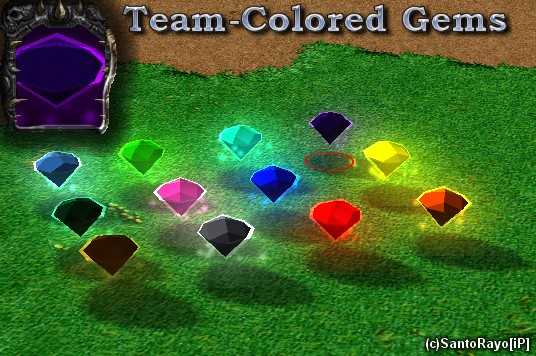
I seem to have had the same problem with the gems being black.
However, if you use them as a model for a unit, they will be the color of their respective teams, but, when there used this way they will crash the game. (I can view them in world editor but not in game)
Quote: "I had a similar problem with this model, as did Gartos Neen. I loaded them but the model wasn't quite right. Instead of a nice colored gem, I got a black gem with a square shaped aura in the selected color. Tried to adjust color but unsuccessful. Tried the texture as a .blp, instead of a .tga, and that's when it crashed the game."
I think i worked it out! If you try and make the gem an item, it gives it to Neutral Passive. As the gems are team coloured it makes the game black. As you wont really use these gems as a unit and not an item, i dont think they are very useful. Ant=-
I had a similar problem with this model, as did Gartos Neen. I loaded them but the model wasn't quite right. Instead of a nice colored gem, I got a black gem with a square shaped aura in the selected color. Tried to adjust color but unsuccessful. Tried the texture as a .blp, instead of a .tga, and that's when it crashed the game. If someone got this model to correctly load, could they please list EXACTLY every one of the paths and which unit they used as their base model. Thanks. (BTW, I am using Gem.mdx, and Textures\LightningBall_Alt.tga as my paths. If someon has something different that works, please share it)
I love the gems and i tried to use them so i imported them and put some of the examples on the map but now my map wont load in the editor or the game!!! please help me ive worked soooo hard on this map and i dont know what to do. If it helps the error message pops up while the editor is trying to load the 13th unit.
You don't need the second texture, because it's already there. White.blp is an original WC3 texture, the model will use it automatically so all you have to worry about is textures\LightningBall_Alt.tga
You can import the model wherever you want. Just make sure, that the skin (LightningBall_Alt.tga) is in "textures\". Then use the Object Editor and change "Art Model" to Import -> "gem.mdx" of any unit you like.

![SantoRayo[iP]'s avatar](/file/www1/images/avatars/645067693403cb70fe06bf.gif)




![0siris[GoE]'s avatar](/file/www1/images/avatars/155183263940b61a08202c5.jpg)


 what gives?