Warcraft III resources & community, 2003–2006 · archived

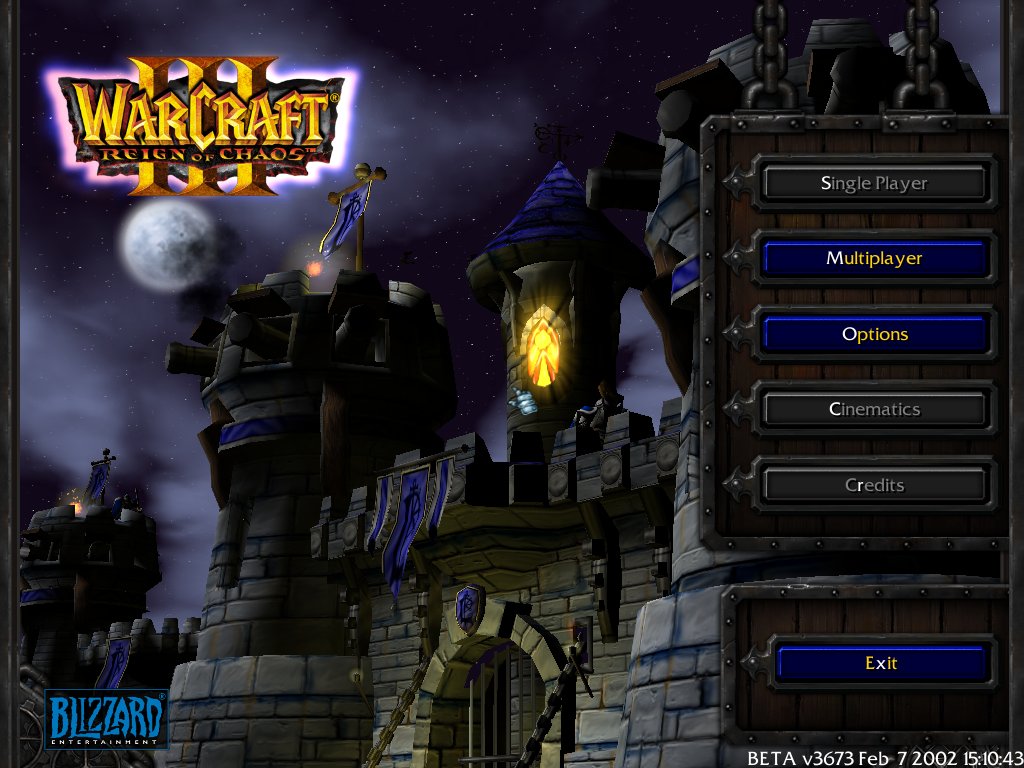
MainMenu3d_beta.mdx

4.61 / 5 (18)
Submitted by Crystalking52Effects1,796 downloads226 KB
Model
MainMenu3D
Polycount
7268
Textures
21
  • Skin 1 ui\Glues\SinglePlayer\HumanCampaign3D\Castle.blp
  • Skin 2 ui\Glues\SinglePlayer\HumanCampaign3D\HumanCampaignwoodmetaltrim.blp
  • Skin 3 ui\Glues\SinglePlayer\Orc_Exp\Stars3.blp
  • Skin 4 ui\Glues\SinglePlayer\HumanCampaign3D\stainedglass1.blp
  • Skin 5 Textures\star3.blp
  • Skin 6 ui\Glues\SinglePlayer\HumanCampaign3D\weathervein.blp
  • Skin 7 ui\Glues\SinglePlayer\Orc_Exp\Moon.blp
  • Skin 8 Textures\cloudstile2.blp
  • Skin 9 Textures\Yellow_Glow3.blp
  • Skin 10 Textures\Flame4.blp
  • Skin 11 Textures\Clouds8x8.blp
  • Skin 12 Textures\Clouds8x8Mod.blp
  • Skin 13 ui\Glues\SinglePlayer\HumanCampaign3D\HumanCampaignflag1.blp
  • Skin 14 doodads\Cityscape\Props\Banner_Long2\flag2_64.blp
  • Skin 15 ReplaceableTextures\Teamcolor\TeamColor01.blp
  • Skin 16 Textures\Footman.blp
  • Skin 17 ui\Glues\SinglePlayer\HumanCampaign3D\Critter_Bird1.blp
  • Skin 18 Textures\Dust5A.blp
  • Skin 19 Textures\Yellow_Star.blp
  • Skin 20 Textures\Yellow_Glow.blp
  • Skin 21 ui\Glues\SinglePlayer\Undead3D_Exp\cloudstile3.blp
Animations
4
  • Anim 1 Stand
  • Anim 2 Morph
  • Anim 3 Stand Alternate
  • Anim 4 Morph Alternate
Particles
14
  • Particle 1 BlizParticle03
  • Particle 2 BlizParticle04
  • Particle 3 BlizParticle05
  • Particle 4 BlizParticle06-squirt
  • Particle 5 BlizParticle09smoke
  • Particle 6 BlizParticle10
  • Particle 7 BlizParticle11
  • Particle 8 BlizParticle11sparks02
  • Particle 9 BlizParticle12
  • Particle 10 BlizParticle11sparks07
  • Particle 11 BlizParticle11sparks08
  • Particle 12 BlizParticle13
  • Particle 13 BlizParticle11sparks09
  • Particle 14 BlizParticleCloud layer
Cameras
1
  • Camera 1 Camera01
Download

Comments

37
Can someone tell how to actually use this as a Mainscreen for Wacraft III?..
WoooooooooooooooooooooooooooooooooooooooooooooooooooW,
That's awesome 5/5, I WANT THOSE MODELS!
is it possible to change your main screen toi this and if so how?
I got the castle n stuff to come up, but the icy fog and white sky won't disappear...
By the way, I was fooling around in the war3x.mpq and found the beta main menu for tFT, reminds me of the good ol days when I tried desperetly to make the downloaded pirate version of Frozen Throne to work, lol.
Wow, havent seen this in a long time
looks very funny!!!! :D :D :D :D :D :D
hey plz tell me how do u use this? :evil: :evil: :evil:
Can i change the Skin of this Model? Where can i find the Skin? :?:
Holy Crap, i never thought I'd see this thing again, but I've seen this before.
I'm not sure if the movie began creation before or after WC3 (ROC) was realeased, but this was in a movie.
One time i was watching a movie with mmy youunger siblings, "agent cody banks" i believe, and in one seen he was doing some odd stuff on his computer, but then to make his comp. look normal, it flashed a game screen. I rewond and pause and it said "Wacraft III" and i argue at the screen of the TV I'm watching it on (Don't ask, i was tired) that that screen wasn't the WC screen, that was this screen lol. (at first i though it was the loading screen to "jumpstart grade 4" that my young siblings play O.o)
Anywho this is a decent backgroud screen, but I don't really like it - 4/5
:twisted:
Maggi first u say wow difficult for noobs to use... then u say how do u use it as a background or do u use it as a unit WTF IS WRONG WITH U LOL
hm, nice :?
@ Vegito. Theres a tutorial here http://www.wc3sear.ch/viewtopic.php?t=739
wow cool but a bit difficult for "noobs" in the editor or?what do u think?


Maggi I think you are a noob in the editor...
how u can use it as main menü and not as a unit?
Yeah very cool model but why "single player","Cinematics" and "Credit" are disabled
Hey Vegito I can make that into a loadup screen for you. Just email me at [email protected] and tell me if you want it, and ill make it for you. :D
How do you import this?
"dies from joy"

and now its time to disect this and make a good gate model :D also those towers would fit nice in any campaign.
and blizzard did make that so ...
wow cool but a bit difficult for "noobs" in the editor or?what do u think?
this is supposed to be useful?? the only reason to use this is if ur doing a big mod with lots of other people
4/5. Really nice, but the red cloud/flames in the battle.net background is flawed.
how do i replace my old menu with this? i dont understand how to import this.
Sorry, but i don't know how to make custom loading screens. You best take your picture to an expert.
dude crystal king can you make this image a loading screen not a campagns screen please ill give you all the credit i can possbily do heres the picture
http://img6.exs.cx/img6/5480/starshiptroopers_2.jpg
awsome, this would be good for the divine right thing (any1 no if thats still going) or dawn of chaos.
Really nice ! And useful too. 5/5
Cooooool :D :D :D :D :D
Sweet! 8)
uuh, how do I change the name in MQP2K? It's the only MPQ tool for mac so...
I've deleted the old file and loaded the new but I can't see how to change name on the new file. How?
Ahh, thanks acolyte, saved me the trouble of explaining myself... And for all those who like this model, please, if you go to Warcraft 3 campaigns, give me a rep please, i'd really like that, i worked hard getting this model to work and i think i deserve a little rep...
http://www.wc3campaigns.com/showthread.php?t=60283

Read this thread it has some information about it.
how do i implament this???
I changed my TFT main menu screen to be like this. I love you crystalking this is so cool.
Good that all these textures are allready in the game. It wpuld be a hard work to import all these textures. And I must say that this looks good.
Oh, i forgot to mention, this model is very high poly and should only be used for custom campaign screens! And another thing, i didn't make this!!! So don't say i stole it! I simply made it useable.