how use this skin?????
2004-09-19
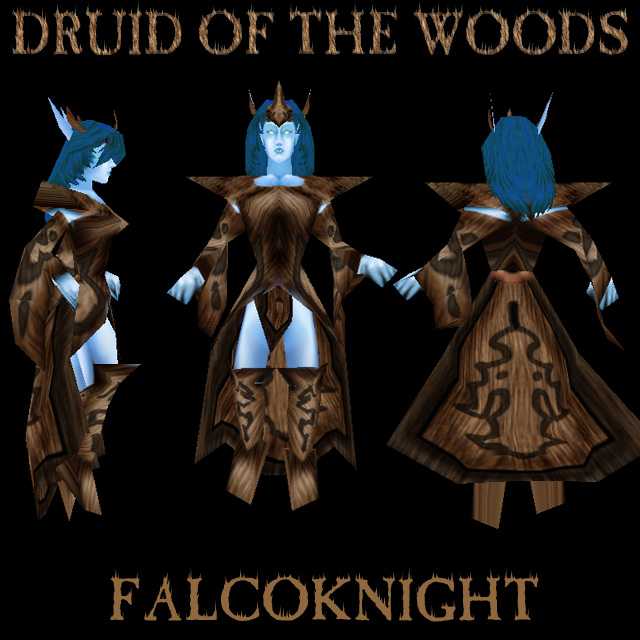
Give it a spell like Tree Form =p Disguises as a tree... Looks cool though not a real night-elfy color.
coloured blind Same here. But I manage.
Use the Color Sampler (alt+click I think) on the NE skins if you want the get the right shade for their skin colour.
the thooths looks like a vampire's tooths
2004-09-14
Well I am only 12 years old and am coloured blind so i dont know what is the difference between blue or purple or green and brown.
I see what you're trying to do. You should make her skin darker and the clothing lighter.
hmm, aren't night elves kind of purpleish though, this is kind of blue.
2004-09-13
looks cool in the shot. lets see how it looks in game!
2004-09-13
at least somone finally tucked her boobs into her shirt lol, it looks ok, but you might wanna shade the skin a bit, 4/5
2004-09-13
I was just gunna try using the filters, atleast it looks remotely good in game
Filters can be good..... if used correctly, and if it's not noticeable that they've been used, and if you work on top of them to fix up shading and so on.
2004-09-13
falconight, why are you giving a tutorial to do wood via filter, using filters is bad, dont try to make more newbies use filters.
2004-09-13
flowing wood garments...yeah that makes a lot of sense. Wood is much more complex then straight lines. I think its definitely lacking.
2004-09-13
Nice. nice Wood clothing, little to light on the skin still,cool skin Lookes like Shevia off of FFA.
4.5/5
2004-09-13
For the Photoshop users here is a wood tutorial:




 Nice. nice Wood clothing, little to light on the skin still,cool skin Lookes like Shevia off of FFA.