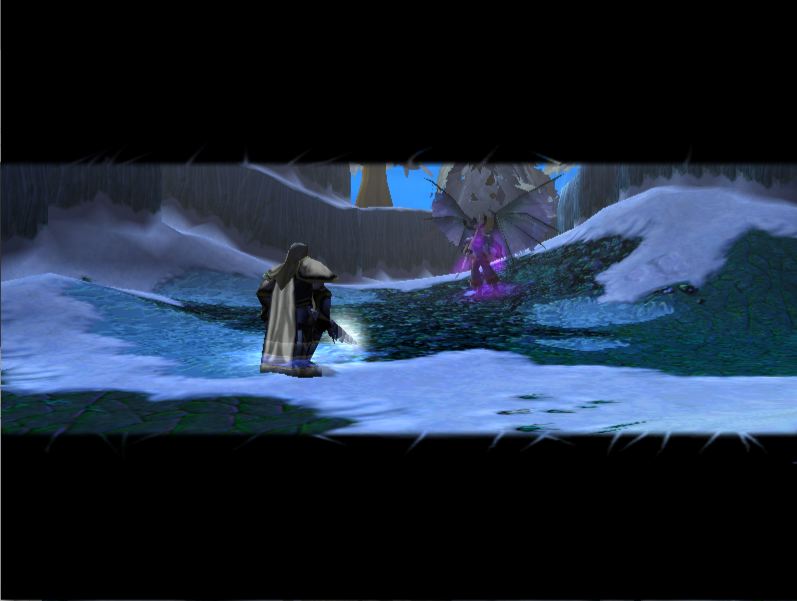
a fade out texture you can use in cinematics. Directions: import a completely black .tga or .blp file into WE. under Game Interface, under Advanced in WE, change the following to the black image 1. Cinematic Background 2. Console Background and the first three options above Console Texture 4. then, during the cinematic, fade out with this texture, and you have a perfect widescreen fade out. for import just delete war3mapimported note that the skin pic is completely crap. that is looking at only the rgb channels and not the alpha one, so it looks extremely crappy. DO NOT JUDGE FROM THE SKIN PICTURE, JUDGE FROM THE SCREENY or check it out ingame
that screenshot is the entire screen. and the blur and stripes is for quality purposes. plus when I didnt blur it it looked like crap ingame. trust me.
edit: waldbar I see what you mean. I can shrink it if you want me to.
This idea seems to be useful BUT -Why don't you simply use a hard border at top and bottom, why blured and these stupid transparent stripes into the black border (can be seen in screenshot)?! -This is extremly wide screen format. 2,35:1 would be enough, but it's more, isn't it?
I saw this only on the screenshot, if this looks ingame different, post another screenshot!