Spit forgot one thing, you have to do all of those steps, then SAVE and CLOSE the World Editor, then RE-Open it. Then it should work. Skin=Kick*ss-ness
Listen! To anyone who is having trouble getting this skin to work do this it worked for me:
After you have the skin imported in the "Import Manager", double click the file "Shandris.blp" and change the extention by checking the "use custom path" check box and paste in the path "units\NightElf\Shandris\Shandris.blp".
Now, you need to go to the "Object Editor" and create a "New custom unit" of "Sylvanas Windrunner". Then go to the "Art - Model File" and double click it.
In there, and this is what I figured out by trial and error because IT WASN'T EXPLAINED ANYWHERE, select the "Custom" check box and paste in "units\NightElf\Shandris\Shandris.mdl" and hit ok.
Then it should properly display the custom skin when you put the character in the map. It worked for me, but if this doesn't work for you then I have no idea. More than half of these stupid, yet AWSOME models I have downloaded don't work and I have no idea why.
Another fine work of art. Can you make other skins that'll either work as a basic fighter unit to your samurai models? Or how about just plain more models of other things? Your work seems to be the best so far so I'd like to see more variations of models made by you.
Actually, this skin not really special for me, since it's lack of variations IMO. However, 1000 people doesn't think so. This should be people choice. Since, there are no people choice, i give you DC.
This skin is nice but....I can't use it....It won't work,It just switches to the normal shandris skin....Idk how to change it to this skin.By the Way I would definately give it a 5/5
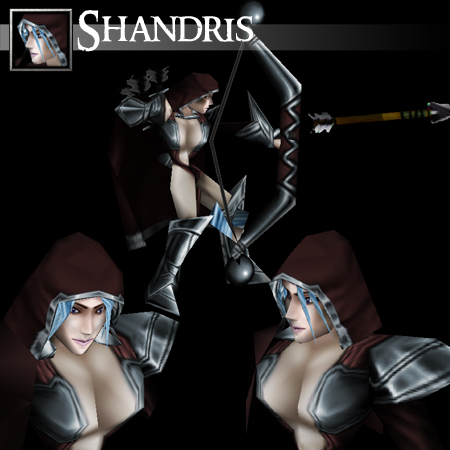



 ) i seen such a great skin(especially the face looks awsome).