Warcraft III resources & community, 2003–2006 · archived

Keyboardmovement

not rated
Submitted by VIRUS_OF_MADNESSSystems840 downloads32 KB
Screenshot
Screenshot
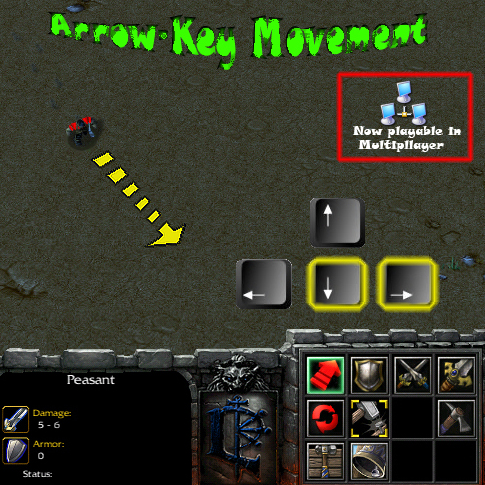
Move the unit with arrowkeys. Now also playable with 12 people =D
File Name
Key Movement.w3x
Author
VIRUS_OF_MADNESS
Download

Comments

26
mmm, the cam lock doesnt want to work with me lol

FOR PLAYER 1 ( RED )

Unit Setup
Events
Player - Player 1 (Red) Selects a unit
Conditions
Actions
Set MovingUnit[1] = (Triggering unit)


FOR PLAYER 2 BLUE

Unit Setup Copy2
Events
Player - Player 2 (Blue) Selects a unit
Conditions
Actions
Set MovingUnit[2] = (Triggering unit)

Damn make it easier


FOR ALL PLAYERS

Unit Setup
Events
Player - Player 1 (Red) Selects a unit
Player - Player 2 (Blue) Selects a unit
etc
Conditions
Actions
Set MovingUnit[(Player Number Of(Triggering Player))] = (Triggering unit)


:wink:
Ehm...how about selecting a unit for it to move? :P

Only the unit (not units) will move that you have selected. When you begin the game none of the units is selected so units will not move. :wink:
This doesn't work!

I tried moving the units with the arrow keys, but only the screen moved...

Edit: oh I got it working, after modifying some of the triggers...
Ok I have updated it. Now only the unit that is selected will move. The camera follows the selected unit. When unit dies or is deselected the camera will stop following him and Arrow keys will not do anything until you select another unit. :D

BrownSnow, I have used quite a different method from yours, I used 3 triggers (1 for select, 1 for deselect and 1 for death). Though you gave me quite a good idea. :wink:
O.O i found a bug in my trigger...! im trying to fix it... please dont use it yet...

::EDIT::
Ok, nvermind, i just set something wrong... its fine, as is
I know i might have left like 50 comments for this .. but i found out another way to alter that trigger ... Look... it locks the camera to the unit now :D .

FOR PLAYER 1 RED

Unit Setup

Events
Player - Player 1 (Red) Selects a unit

Conditions

Actions

Set MovingUnit[1] = (Triggering unit)

Camera - Lock camera target for (Triggering player) to (Triggering unit), offset by (0.00, 0.00) using Default rotation

* Bows * thank you, thank you :lol: lol...

Well, im still going to make this trigger more sweet...


::::::::EDIT:::::::::
Wow... i think that the trigger i made allowed you to move any unit that you selected :D . So i added in a condition... it needs to be modified to each played due to the event... Ex. ( if the Trigger event is for blue, then the condition needs to be for blue )

FOR PLAYER 1 RED


Unit Setup
Events
Player - Player 1 (Red) Selects a unit
Conditions
(Owner of (Triggering unit)) Equal to Player 1 (Red)
Actions
Set MovingUnit[1] = (Triggering unit)
Camera - Lock camera target for (Triggering player) to (Triggering unit), offset by (0.00, 0.00) using Default rotation
Ok, it was pretty easy to make it go for any unit that you select... took me like 5 mins lol... :lol:

well... heres the trigger HOWEVER: im still working on making it work for 12 players... sorry lol


Unit Setup
Events
Player - Player 1 (Red) Selects a unit
Conditions
Actions
Set MovingUnit[1] = (Triggering unit)
Set MovingUnit[2] = No unit
Set MovingUnit[3] = No unit
Set MovingUnit[4] = No unit
Set MovingUnit[5] = No unit
Set MovingUnit[6] = No unit
Set MovingUnit[7] = No unit
Set MovingUnit[8] = No unit
Set MovingUnit[9] = No unit
Set MovingUnit[10] = No unit
Set MovingUnit[11] = No unit
Set MovingUnit[12] = No unit


::::::::EDIT::::::::

ok, ive made it for 12 players :D . But on the downside... it takes 12 triggers, one for each player. Each trigger looks almost like the trigger above but altered. Observe:


FOR PLAYER 1 ( RED )

Unit Setup
Events
Player - Player 1 (Red) Selects a unit
Conditions
Actions
Set MovingUnit[1] = (Triggering unit)


FOR PLAYER 2 BLUE

Unit Setup Copy2
Events
Player - Player 2 (Blue) Selects a unit
Conditions
Actions
Set MovingUnit[2] = (Triggering unit)


FOR PLAYER 3 TEAL

Unit Setup Copy 3
Events
Player - Player 3 (Teal) Selects a unit
Conditions
Actions
Set MovingUnit[3] = (Triggering unit)


You get the point... you set the variables to match the players and so on.... Well its pretty easy to do. I havent fully tested it yet, tho. I need to test it online to see if the Triggers work for ALL players... Ill get back to you soon after i do that.
Hey, its me again... I get what you mean, and im going to try and alter the trigger to make it availible for the unit(s) that you are selecting... Ill let you know if i find anything out.
can´t you make the direction arrow into a red spot or like a laser.... it wuld bee werry nice


I don't quite understand what you mean. CAn you plz tell it in a bit more detail?
can´t you make the direction arrow into a red spot or like a laser.... it wuld bee werry nice
Yeah it was meant to always move the peasant. (In this game) In other games you may update it.

For example, when peasant reaches a region you are able to move a different unit by just modifying the Variables.

I can make work with multiple units at the same time but normally in game it will be a bit messed up if you move like 20 units at the same time.

I think that people normally use it for 1 unit (At a time) in games.
Very nice work, way better than Azeroth Grand Prix system... It takes like 2-3 secs for the unit to move after arrow keys, this one responds instantly.. its awesome. 4/5, i might even make a new game because of this trigger :wink: . Most people would think that 19 triggers is alot. But for a movement system... wow thats tiny :D .

1 thing, i dont know if you designed it only to move one unit, but even when you select another unit, it still moves the peasant.


::EDIT::
If you did designed it to move one unit, i give it a 5/5 for a game that you only have one unit in.
This is great. Just what i needed for my map i give it a 4/5 :D
THIS LOOKS AWSOME... ill download it, try it out then ill let you know what i think.
So many downloads but hardly any comments. :?
Cmon guys I need to know your opinion. :)
Div_S, I am not quite sure what you think but I've made it be playable with 12 people quite a while ago :?

Well ok, actually 27 and a 1/3 hours ago but still :P
Well, i think that is better u create 12 triggers just like this than just give this kbmoviment to one player...
If u think that if u do that it is going to be "ugly", its ur decision... :wink:
I did it! Finally I've made this system be playable with 12 people! :D

Just add all the players to the event thing to make it multiplayer

It's not THAT easy. I’ve used Loop action so it works for all players. :)

I have no infinite triggers so the game would not really lag, and if you want to make units fly instead of walk then that’s cool by me, but move is better then rapid teleportation because it causes less lag and it shows moving animation. :wink:
Just add all the players to the event thing to make it multiplayer, however, key lag on battle.net makes this quite useless for multiplayer maps. (Key lag makes everyone but host have a few seconds delay on the move trigger) Also, this system would mainly be used for maps that don't want to use normal movement system, so the fact that it makes the unit walk instead of instant move makes this even more useless. Oh, and it leaks.
if you can make a 12 player working keybord movement thingy, that would be very VERY usefull
Div_S, well as I said I will make it be able to be used by lot of players. I just first need to think of a good way how to. I can make 12 of these triggers but I don't think it will be a good idea. :?

It would actually help if you gave an idea of how to make this system being playable with 12 people then saying it is useless because it can't. :D

About it being used in melee map...as soon as you add 1 extra trigger the map becomes non-melee, so you’re right, it can't be used in melee. :P
Finaly someone that creates this :)
gj its usefull.
desagree
dont think that it is much usefull, as long just one player can use it.
If u want to use in a campaing, well thats diferent, but u cant use it on a meele game ( never ), u cant use it on map tests and etc
but i find this intersting at all, ur ss seems realy good, it shows everything u want to people see in ur sistem, and etc
Gz for the good and well made sistem, but not so usefull at all
Seems like a usefull system.
You can move units by using arrow-keys (Or how ever you want to set it up). Unit will MOVE (not teleport) diagonally, horizontally and vertically. :)

Please send bugs to this forum if you find any. Also PLEASE write opinions as well. it took me quite a while to make this work well. :D

Also please give credits when use it in your map.