Much easier to use (there are jass functions, but to add your stuff you don't need to know anyting about jass). Initial save algorythm also saves abilities.
mdblaze, as you can see all error0024 did was copy and pasted the gold and changed it to lumber so you just need to copy and paste (KEEPING IT IN THE SAME ORDER) then replace lumber with A[playernumber] the reason A should be an array is becaue every player might need a Variable A to themselves so you make it an array and give them Array location = to there player number. If not everyone will share the A variable which might be what you want or not.
Neostorm i love your code here i added something it also saves lumber
============= Store Player Data ============= -------- Lumber Data -------- Set Temp_Integer = (Temp_Integer + 1) Set NPS_Data_Int[Temp_Integer] = (((Triggering player) Current lumber) / 1) ============= ============= Write Data To Unit ============= -------- Lumber Data -------- Set Temp_Integer = (Temp_Integer + 1) Player - Set (Triggering player) Current lumber to (NPS_Data_Int[Temp_Integer] x 1) =============
----------Last Bug fix---------- Here is the fix i found the problem was the For Each calculated the extra number of leading 0's needed as well as doing a for loop. The result Needed 0 = 3 Loop = 1 Needed 0 = 2 Loop = 2 *Loop stops while needing 1 more 0.... causeing the save code to be missing one character.
NPS Save <---Trigger Name Change
For each (Integer Integer_A) from 1 to (NPS_CMap_BitsRq_Total - Length(NPS_Buffer_Bits)), do (Actions)
    Loop - Actions
        Set NPS_Buffer_Bits = (0 + NPS_Buffer_Bits)
        Trigger - Run NPS Save TIP <gen> (checking conditions)
To
Set Temp_Integer = (Length of NPS_Buffer_Bits)
For each (Integer Integer_A) from 1 to (NPS_CMap_BitsRq_Total - Temp_Integer), do (Actions)
    Loop - Actions
        Set NPS_Buffer_Bits = (0 + NPS_Buffer_Bits)
        Trigger - Run NPS Save TIP <gen> (checking conditions)
so basicly set the temp int and replace Length(NPS_Buffer_Bits) with Temp_Integer this was not a big issue it only effected the case were people could increase the bits of some variable without makeing the password larger.
Hello neostorm. I was just reading this and well I have a question. I like the looks of this alot but theres one thing that I was wondering can be added. 1 thing that could probally do unlimited things! Is there a way to make it load and save varriable points? Like if Varriable-A =5 can u save it? So the next time you load it will load the playerowned varriable-A =5 for you? If this is possible then could you tell me how to add that. If this can be done you can save/load certain varriables that can be used for skills! Like mining, smithing, fishing, cooking, woodworking and other things. think about this... you said you could only go up to a certain level for the codes or else you couldn't fit the password? Well if it can load varriables for playerowned targets(specifies the certain player so can be used in multiplayer games) then you can have unlimited levels! For each monster of type ... it adds ... to varriable-A for u. Every certain ammont of ... of varriable-A you get, you gain 1 of varriable-B. And then varriable-A goes down to 0 or a -# making it take more kills to get enough points of varriable-A to gain another varriable-B. And for every Varriable-B you get, you get a certain number of atribute points added to the stats you want them to be added too! This could possibly lower the ammount of password-code space needed!
this is soooo cunfusing lol. I tried to read, but I couldn't tell who was answering who... Anyway does this program save custom items or items at all? And does it save custom heros. Tell me if it's me your answering cause I won tbe able to tell lol Oh and if i can't save these things how do I make it so it can?
LOL!!!! I'm a moron.... No wonder I didn't understand it I didn't relize it was from bottom or page to the top(didn't read dates) I'm not used to that lol. Oh, and one more thing...well, two more, If you use a trigger to get lumber can it still save that cause some saves uses amount of kills to save....and if you use a tomb power up can it save that? and what are max on stats or was 255 max... was 255 max stats or lvl? So cunfused. lol of well, one last thing. do we hav eto change it to save lumber or is it already saved and we only have to download it?
Lol ok well since no one is answering or the answer will prolly be really long....is there a txt. or somthing thats a guide to how to use this thing? cause when I extracted files and looked in folder all I saw was the program...no guide.
sounds great ill try getting back to you on this with any errors or anything otherwise gj [edited] wow i have seen this in a map before short simple and pretty hard to crack with the capitals and lower cases very nice 5/5 so far i like this the most short and simple =) a good way to use this is instead of copy past and stuff go (back up map first) to "Scenario"->"Map size and camera bounds" and check the box "Modify map bounds" and VOILA you have a map with the triggers built in. i recomend you reading the comments so you can learn but optianal this is how im making my map. and to get rid of the items and heroes press "U" for units and press "space" and the select them all hit "delete" then go to the triggers and delete the quests and thats it the map is yours for the taking just edit loading screen to say so OPPS forgot U MUST CHANGE THE CLASS ARRAYS! if you dont then your hero wont save since its not in Array ------------------------------------------------------ www.freewebs.com/darkwatchstudios
Neostorm can u help me ? like this ..... i want a save/load code that when u type -load (the code) then create an wisp and save the exp when he selected the hero he get exp... can help me ?
Neostorm i love your code here i added something it also saves lumber
============= Store Player Data ============= -------- Lumber Data -------- Set Temp_Integer = (Temp_Integer + 1) Set NPS_Data_Int[Temp_Integer] = (((Triggering player) Current lumber) / 1) ============= ============= Write Data To Unit ============= -------- Lumber Data -------- Set Temp_Integer = (Temp_Integer + 1) Player - Set (Triggering player) Current lumber to (NPS_Data_Int[Temp_Integer] x 1) =============
Bug Found and Fixed This Bug only effected certain combinations of bit's i belive if you had a odd number of total bits to save this bug could happen. If your current setup works you dont need to worry about this update.
The issue most people were haveing was the Last part of the buffer was not being read (causeing the validation to be invalid). I have added code to make sure to read the buffer one extra time. This is a FIX but there could be other cases that require the buffer to need to be read more than one extra time.
It was a rather short change but took some time to figure out. I'm going to look into editing buffer to Bits to not require this added code.
Trigger: NPS L Write Password to Buffer
Function: (added at end) -------- Bug Fix Oct 20, 2005 Temp Fix --------
Set NPS_Data_Bits[NPS_Buffer_Ptr] = (Substring(NPS_Buffer_Bits, (Max(1, (((Length of NPS_Buffer_Bits) - NPS_Data_Int_BitsRq[NPS_Buffer_Ptr]) + 1))), (Length of NPS_Buffer_Bits)))
Set NPS_Buffer_Bits = (Substring(NPS_Buffer_Bits, 1, ((Length of NPS_Buffer_Bits) - NPS_Data_Int_BitsRq[NPS_Buffer_Ptr])))
All i have to say is curse you DBZ fans and your masive levels
And as i always say if you can't figure out the problem i can always take a look at the map to figure out what the problem is. But in your case it looks like there is something wrong. So i'm looking into it now
errr dude I'm posting (ALOT later than my earlier post...kinda brings back memmories ) Well anyway I'm posting here because I put the thing in my map, add Crypt Lord to the array, saved him at level 320 and loaded him....it came up as a level 1 crypt lord ... not lvl 320....Anything you can say?
UPDATE!!!! I have updated it from verson 2.4 to 2.6+
Removed issue where unit aquires item + For each Integer B combined in a trigger would mess up the load system. It was alot of work but i removed every instance of Blizzards Int B and Int A.
Added Multi player detection system you can enable this to not allow saveing in single player games there for you can't cheat then save.
I might add Backwards compatiabilty for items what does this mean? well if you plan ahead to make a second map useing the items from a previus map this will allow the player to load his character with items from the second map but not lose them from saveing (but he won't be able to use them ether)
Q&A Do i need to update my map with this verson if i dont have any unit aquires item issues? If so how should i do that?
No you dont need to update if it works unless you want the added functions
First i would BACK UP before messing with your map then, did i say BACK UP you MAP ya i did nm ok then
1. Select the triggers you changed such as item array setup, hero array setup, and setup move them to a new folder. Then add one letter to the end of the trigger names EX: NPS_Item_Array_SetupX
2. then delete all the old triggers in the 3-4 folders of the system Yes you will get plenty of trigger disabled but that's ok.
3. open the new system copy and paste the new triggers in Delete the 3 with the same names as the ones you saved. Yes you will get a error or two. Fix the names of the files you added X to the end back to the way they were then use CTRL+F to renable any of the triggers that were disabled from deleteing the 3 triggers.
Hmm, is the saving of items enabled from the beginning or do I have to turn it on? I've already added the items I want to the "Item Array Setup" but none of them loads when I load the hero (level and gold etc. works great though).
EDIT: I'm sorry, I didn't read your notices careful enough. Problem solved.
Been away i'll take a look at it to see what could do this. If i can't find anything i might just see if i can look at your map to see what might cause this
My guess might be 1. Set Player_Hero_Array[(Player number of (Triggering player))] = (Last created unit) This is a demo so when you select the hero this line keeps track of what hero you selected. It's very important because whatever hero is in this variable is the one it trys to save. I would make sure that how every you let the player pick a hero you make sure that this line follow the creation of the hero.
2. There is a trigger that fires when a unit enters the map/region. If a trigger runs when the unit is being loaded or saved it can mess up the save. This is because i used For Integer B. When i created the system i was unawear that some trigger could interupt others such as unit aquires Item Event.
3. Make sure you have the correct heros in the class array setup if your hero is not there then i'm not sure what will happen maybe give you the wrong one.
hey neostorm, i have been trying to get your save system to work on a map i have for a while, problem is, whenever i do a -save, i get a pass that will look something like this W330 0000 0000 000XG1 and when i try to -load that pass it says valid input, takes away my hero, but i get no hero back. So far i have put 15 heros into the map, so i have Class_list_array_BitsRq=4, and i have 80 items, so i have Item_list_array_BitsRq=7. This is all that i have modifyed, so am i missing something here?
my problem is same with nebu_Bei When i save and load my hero it will became not same T_T like 1st one i put admiral proudmore 2nd one mountain king when i save and -load xxxxx it will became admiral proudmore plz fix this
Sorry about that hope that problem didnt' cause to many people trouble. Ya it was a one click fix the save int was actualy saveing the agi instead it's fixed now. If anyone has a previous verson you simple need to click on the S Store player data trigger and go to the part where it says hero int and change agility to intelegence easy fix.
P.S. wish i knew a way to make it easyer to use but oddly enough you really need to understand how it works in order to be able to work it into your map. I find the how this works very helpful
Nebu_Bei,
The trigger removes all hero's the player owns since i expect you'll only be playing with one hero. So if you wanted to test it in your map you'll have to make sure once you select your hero that you set player_Hero[ player number ] = to last created hero. In the demo map when you select a hero it makes that hero and set's it.
I would make sure your hero is in the hero array and if you have added more hero's to change the bits required to a larger number. so if you have 20 hero's then you need to set the bit_req to something like 5 (2^5 = 32) allowing you up to 32 different hero's to save. Originaly i think it is set to 3.
Ok neostorm, this is an AWESOME code, but, I have a quick question. I added the "Save Lumber" part to the code (even though this doesn't have anything to do with it because I tried it without the lumber part added) but whenever I type -load XXXX all my heroes disappear and none is created. The part of the trigger that creates the unit: Unit - Create 1 Class_List_Array[NPS_Data_Int[Temp_Integer]] for (Triggering player) at (Center of Hero Load Center <gen>) facing Default building facing degrees isn't working. I tried removing the "NPS_Data_Int" to see what would happen, and it created a different unit, which was the same unit I specified as #1 in the trigger that stores the different heroes to be used in the code. So, basically, what can I do to fix this, I haven't got any ideas!
took me a bit but i think i got it down. just what i needed for my upcoming map. all this talk about bits and all made my head hurt(hehe) but after time of looking at it over the past week ive goten it!(more or less) Im guna keep giving this close look and study so i can get it to work fine. I gave it my best shot at trying to get this to work so thats all that matters to me.
Hey great job! Problems: Intelligence and Agility always load as the same, even though i had way more agility than intelligence, could be used as a cheat somehow.
REQUEST: CAN YOU PLEASE TELL ME WHAT SPECIFICALLY TO EDIT SO I CAN SAVE/LOAD NEW HEROS, ITEMS, AND SKILLS? TY
No clue how i could make it any easyer to use without takeing away the modability. The system takes numbers in a array and turns them into a password. To get the best compression you give the largest the number you are saveing, in the number of bits. Ex how to calculate what the largest number you are saveing can be. 8 bits = 2^8 = 256 - 1 = 255
Not to be rude but if you dont understand it there's not much i can do.
You can save any number you want you just need to give enough bits to be able to hold that number sure you could save 1073741823 you just need to give it 30 bits. Well i suggest you count the number of heroes/items/Max level you need to save then adjust the bits in my system to be able to hold those numbers then do a -save and see which password is smaller. I'm basicly done with the system but i might add a few feacher later on.
lets say you have 128 or less hero's 7 bits 128 items that would be 7x6 = 42 Max level 255 so 8 more bits error check 9 bits That would make 66 bits / 6 = 11 11 charcter password
ya i see that, Elil's save code look very complicated though, my save code is not that good but could save Unlimited heroes/items/levels can't save golds/lumbers/attribute stats (its bugged for some reasons) will fix later, you can't use each other codes in my save load like (Vquest) well if you need any helps,,just ask me bro ill do the best to help you with the save load system.
I created this after seeing Elil's His was the best i had seen but it lacked a couple things i needed, and i had a hard time removeing stuff like saveing stats, and even when i removed it ... it really did seem to work as in lower the size of the pass. Also i was sick of long passwords in games. So i started from scrach and created my own. The main difference are these.
Password Is unique to player (Players can't use each others pass) Able to use base 64 (his was limited to 32) No use of jass All data is placed inside of one array (keeps it simple) If you set the bits to 0 for a piece of data It will be excluded (i'm not so sure it was that way with his)
Basicly i'm working on a rpg and i needed to save alot of data 64 Techs, 128 Item, Skill points, Level, Level Up Points, Gold. So i needed the base 64 (store more data) and i needed security that players could not use each others pass
Thank for the feed back and i hope you give it a chance because i do belive (you will see a better result) it is far more effecent than makeing a couple letters in a pass represent a number.
Haven't try your save load system Neostorm, i read all the posts below, your save load is the same as Elil's save code, and i've tried/checked his, as much as you add more in save system for Items/Heroes/Levels and increase the Bits of saving funtions/variables, the codes will be as long as 80 to 100 Digits/letters, i dont know if your save code is the same as Elil, cause his save code using Bits variables to increase same as your, i tried Elil's save codes when i started to make Angel Of Death ,,but i didn't like the long codes, so i asked a friend to helped. Thanks for the post in my map download section bro !
well you could have up to 1024 custom items but that means 10 letters at least. But think V quest can only hold up to 100 items and the password is at least 10 letters /snicker
So 8 bits goes toward error checking (Default) You need 8 bits to save a number that can be up to 255 2^8=256 8+8=16 so Number of bits divided by number of bits a Letter holds
16/6 =2.666
So if the only thing you are saveing is level then it will be 3 letters and if debug info is on then you'll get the message (1) bits are not being used (2) bits are not being used
Just adjust the bits for your desied numbers then run the map and -save you'll see how many.
When you save items passwords can become very larger because how ever many bits you devote towrd items let's say 8 bits for up to 255 different items. Because there are 6 item slots 8x6 = 48/6 = 8 letters, Which is not so bad but it adds up quickly because who doesn't want to have up to 255 saveable items.
EdwardSwolenToe,
My guess it you might of forgot to updates the number of bits or forgot a piece of the code when changing it. Easyest thing would be to just start over. Then make the change you want 1 by 1. Add hero's update hero Bit's Requred. I might update the map later and just set it up to do anything/everything you might want to save. Then just set the bits required to 0. Then all the user would have to do it go through and set the bits to the size they need. since anything that has bits set to 0 is just excluded from the code since it doesn't use any bits.
Go to Debug folder and turn the 3 triggers initialy On to Off
Your seeing debug text that is there to help you make the most of your password.
When is says Adjust bits by 1 it's because of this, when you change bit's per hero from 2 to 3 the password now needed one more charcter to represent the extra data.
Well one Letter holds information for 6 bits. So your only useing 1 of those 6 bits. So you have 5 extra bits that are not used. The text is just saying Hey you have 5 bits extra why not use them. Because it's not going to make your password any longer.
I didn't have any trouble adding a hero so i'm guessing you just thought the text ment your were doing something wrong.
EDIT:
I updated the map with a How This works? Which explains how it works and includes a list of Possible updates. I also added info to turn off the debug text and edited the text to explain what it means better. And actualy used a spell check lol Enjoy and thanks for positive feed back
well i have 5 heros, and i changed the variable from 2 to 3, although it said some error and said try increase by once, which i did, which gave me the same error.
Ok i'll see what i can do clear it up. When you added the class list did you adjust the number of bits? it's at the top of the array. Normaly it is set to 2bits which is enough space for 4 heros if you add hereos you must also increase the number of bits. This is how the system is effecent the more bits you have the larger the the number can be and the longer the password will be.
When i say bit, a bit is a 1 or 0. If you have 2 bits there are 4 posiable combinations 00, 01, 10, 11.
2 raised to the power of the number of bits = number of combinations
2 ^ 3 = 8 combinations so you could have up to 8 different hero's to save. If you give it 3 bits.
im sorry but basically everything is unclear to me. im not sure what i need to change to get it working properly, as: 1. the hero's stats arnt changed 2. the hero isnt of the one saved (i edited the class lists to include my heros although it always load up as the first hero on the list) 3. im unsure what you mean by " if you can place a number into an array (for save) and load just reads those numbers and uses them."
A few functions are built in like getItemNumber and getHeroNumber. They search a list of items/heros and place the number in the data array. 1. Name how large you want the piece of data to be in bits 2. Place the number/data in the array 3. Run -save , your numbers in the array are now a password NPS_Data_Bits_Rq[1] = 4 :: (so 4bits = 16 so if a number(hero level) goes past 15 then when i load him he will only be loaded as a level 15), (5bits would let it save a number up to level 31) NPS_Data [1] = hero level NPS_Data_Bits_Rq[2] = 14 :: ( if gold goes past 12383 then when they load it will be 12383 ) NPS_Data [2] = player gold.
4. Setup Load to use take data from the array in the same order. Set last created hero Level to = NPS_Data [1] Set Triggering Players Gold to = NPS_Data [2]
That is it. Like i said if you can place a number into an array (for save) and load just reads those numbers and uses them.
Read Me Explains it all. If anything is unclear let me know and i'll try to Edit some of the Read Me to make it clear.
Found a unexpected bug in the system if a unit has no item in a slot the item is not considered no item So i'll have to add some code to fix that misconception. It still works but no items are assigned the last number of the item array.
EDIT:
Done fixed bug 0 now represents no item like it should.
ok, if i can figure out how to use it for custom hero's then i will test it extesively, and probably will be around a 4 or a 5 b/c this saves my rpg, if i cant understand it then it will be tested with normal heros and it still will probably be a 4 or a 5, but if i cant use it o well....
yes it's save/load and if you can understand how to place a number in a array and then how to use that number afterward then you can figure out how to setup custom heros. Map Read Me explains it all.
On a side note (not directed toward Final) If you’re going to give me a low rateing give an explanation. Because I hate when people try to discredit someones work for no reason. For whoever voted 1 your a coward to vote with no comment....
and is this a save/load password for saveing a char and reloading him like in an rpg cuz if it is then it is what i have been looking for, and does it work for custom heros, b/c if it dont then i am screwed or if i have to change it for custom heros then screw it
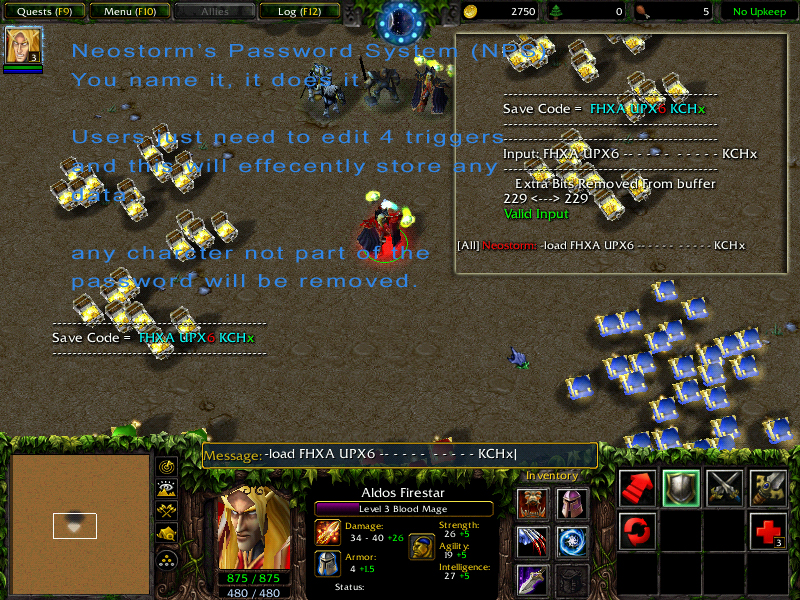
No i was just trying to show that if a player types in a charcter that is not part of the password no matter how many or where they type it. The system still removes any charcters that are invalid then uses the remaining to calculate the password.
Also why does it say Extra bits removed from buffer? Because if the total number of bits you allocate for your data is something like 7 and your useing a 6bit (64char password system) then the password will have 2 charcters that represent 6x2= 12 bits so your not useing 5 bits of your avaliable space. So in short if you have extra bits why not use them to have your max stats 255 instead of 128 by uping the number of bits you allocated for stats or something.
wow before i made my first post it was under wrong category. No use of game catch. String + Varbles = ultimate password system. The only password system that comes close is elis's which is more efferent but uses jass and can not use a base 64 system easily. The reason my other spell does not show up is because i reworked ark's tri blade spell. So if you wanted to see it do a search on tri blade
Password system i created. And i think it's the best. Absolutely Efficient. NO wasted space for data.
Easy to use just place data in the array run trigger and you receive a pass
player types a pass all the data is loaded into array and user then uses that data however he/she likes
Adjustable Security - you are able to devote as much space to security as you like
Users Player name in error checking - players can not use each others passwords
Error prevention - data to large to fit in allocated space is adjusted.
invalid characters removed from input passwords
Feed back on weather the player could increases data size without increasing password size.
NO JASS to confuse average user.
Adjustable number system from base 16 number system to base 32 or base 64 to provide the smallest password. Could do base 128 but i don’t think there are enough characters a player could type in.
Umm... so this actually passwords the map? I'll take a look at it but i have the feeling that you have been using game caches or variables. Doesn't sound too difficult. Also can you give me the name of your second spell (link would be best). It doesn't appear on your profile.



 this is soooo cunfusing lol. I tried to read, but I couldn't tell who was answering who... Anyway does this program save custom items or items at all? And does it save custom heros. Tell me if it's me your answering cause I won tbe able to tell lol
  Oh and if i can't save these things how do I make it so it can?


 ) Well anyway I'm posting here because I put the thing in my map, add Crypt Lord to the array, saved him at level 320 and loaded him....it came up as a level 1 crypt lord ... not lvl 320....Anything you can say?


 Can u plz help me?