Warcraft III resources & community, 2003–2006 · archived

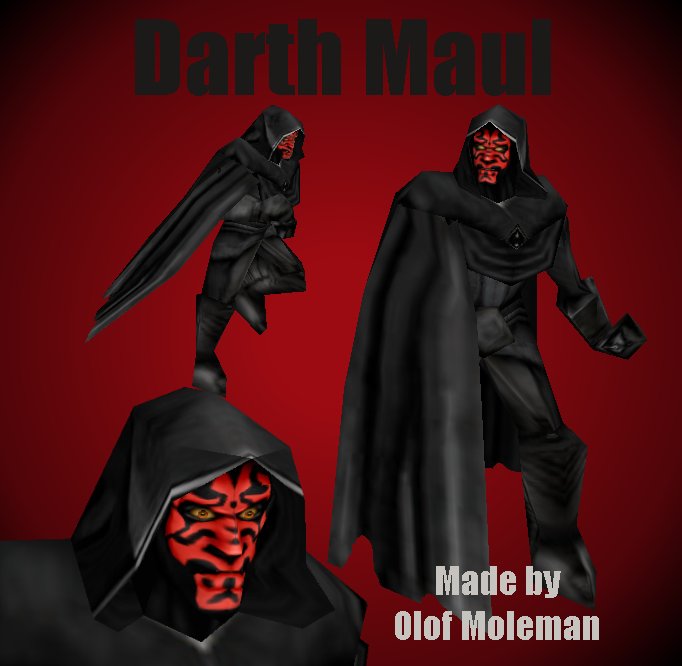
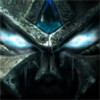
DarthMaul.mdx

4.44 / 5 (9)
Submitted by olofmolemanUnits - Star Wars2,217 downloads254 KB
Made from the Medivh model
Give credit when you use this in your map
Model
Medivh
Polycount
405
Textures
4
  • Skin 1 Textures\DarthMaul.blp
  • Skin 2 units\Creeps\Medivh\StormCrow.blp
  • Skin 3 Textures\Clouds32_anim.blp
  • Skin 4 SharedModels\FeatherPurple.blp
Models
2
  • Model 1 SharedModels\FeatherPurple1.mdx
  • Model 2 SharedModels\FeatherPurple.mdx
Animations
22
  • Anim 1 Stand
  • Anim 2 Walk
  • Anim 3 Death
  • Anim 4 Dissipate
  • Anim 5 Stand First
  • Anim 6 Spell Attack
  • Anim 7 Stand Second
  • Anim 8 Stand third
  • Anim 9 Stand Talk First
  • Anim 10 Stand Talk Second
  • Anim 11 Stand Talk Third
  • Anim 12 Stand Talk Fourth
  • Anim 13 Stand Alternate -1
  • Anim 14 Walk Alternate -2
  • Anim 15 Walk Alternate -3
  • Anim 16 Stand Alternate
  • Anim 17 Stand Alternate -2
  • Anim 18 Death Alternate
  • Anim 19 Walk Alternate
  • Anim 20 Morph
  • Anim 21 Morph Alternate
  • Anim 22 Attack Alternate
Particles
3
  • Particle 1 SuperSpray04
  • Particle 2 SuperSpray05
  • Particle 3 BlizParticle04
Ribbons
2
  • Ribbon 1 BlizRibbon04
  • Ribbon 2 BlizRibbon05
Download

Comments

25
read before you post, you can add a lightsaber with attachments.
Good,Good.But were is his sabre.:?:
4/5 just coz of this slight problem.
Yes the paths are correct, you are probably doing something worng because there is nothing worng with the model.
Quote:
These pathes are wrong. this is how it should look
Textures\DarthMaul.blp
DO NOT change the path of the Darth Maul model and his portrait

SharedModels\FeatherPurple1.mdx
SharedModels\FeatherPurple.mdx

Ya i tried those paths..they don't work, well they don't work for me i did it exactly the way you said it and BOOM! there goes that green checkered box on my map. It says on the bottom left corner "Could not load DarthMaul.mdl". Im extremely mad that it did that. You have a perfect model (5/5) it's just that i wanna use it :P
Ops can you take the 2-handed double lightsaber on him it looks so cool in the first movie plz 8)
Skin Textures\DarthMaul.blp
Model any, but the best path i think is Units\Sith\DarthMaul\DarthMaul.mdx

SharedModels\FeatherPurple1.mdx
SharedModels\FeatherPurple.mdx


These pathes are wrong. this is how it should look
Textures\DarthMaul.blp
DO NOT change the path of the Darth Maul model and his portrait

SharedModels\FeatherPurple1.mdx
SharedModels\FeatherPurple.mdx
GOD D**NIT i cant get it to import!!! cursed paths! I tried using the paths that dark dragon left but there not working right. im not sure why they all seem right.
Heh this will be a great model for my RPG. I wont be using it as Darth maul though :). Anyways Great Job on the face this must be one of the best models i have came across. 5/5
Just what I needed!! :P
Battle For Endor is mine and Tim.'s map, as of now, I didn't plan on using a Darth Maul model for it, but anyway, I think he means it's good, and he thinks it's worthy for a Star Wars map.
GJ Btw, his face looks almost perfect, I personally would think he'd look better without the cloak. Than you'd have to adjust the model anyway. But yeah, 4.6-5/5 from me. Good luck :D
Tim. what do you mean? Quote: Never the less, this will do fine for Battle for Endor.
Nice Model man 5/5 :D The best of star wars ever
Not much a a modeling change as it is a skin. However the attack animation needs work (Of course you cant adjust this without 3ds Max...and with no working inporter you'de have to make all animations from stratch...)

Never the less, this will do fine for Battle for Endor.

As always, thank you, and 4/5.

(Its a little tacky that "Model Name: Medivh ")
lovely, perfect 8)
The model is not so special but the skin is !......! PERfect, why didnt u just skin medivh? they look the same
absolutely gggggggggggggggrrrrrrr8 model!
Skin Textures\DarthMaul.blp
Model any, but the best path i think is Units\Sith\DarthMaul\DarthMaul.mdx

SharedModels\FeatherPurple1.mdx
SharedModels\FeatherPurple.mdx
FIX A LIGHTSABRE PLZ 4/5 :)
Can someone please tell me how to import this model? Even witht he Import Tutorial I don't know how to :( What does everything has to be..? war3imported things don't work and I don't what else should be there >.<
It's called a lightsabre not a lazerstaf
SUPER HELL YEAH !!!!
Oki,Soooo,Ya can use a laserstaf,huh :?
OKI,Sorry 5/5 then :D :D [/i][/b]
:shock: With the Lightsabre is splendid!
HELL YEAH !!!!
But the lasorstaf, huh ??2/5...no lasersatf...
:D Very good face,this will be useful for any Star Wars campaign 5\5
The model info didn't work, so I'll just post the info here...
A Darth Maul model made from Medivh. You can use the attachment double-lightsabre by Sansui, you can download it here: http://www.wc3sear.ch/index.php?p=Models&ID=1723&sid=

or the Doublelightsaber by Illidan(evil)x, you can download it here.
http://www.wc3sear.ch/index.php?p=Models&ID=2833&sid=0e4bbfdc3e57f0bd9fccbc4a7c9e93f0